
The white band is our common symbol of the global fight to end poverty.
It was agreed as a worldwide symbol by the Global Call to Action Against Poverty, the world's largest ever anti-poverty movement with organisations representing more than 150 million people in over 80 countries.
During the Global Month of Action this year, from 14 September to 17 October, there will be white band actions all over the UK and around the world.
The white band was the symbol of MAKEPOVERTYHISTORY in 2005, when 8 million people wore the white band in the UK. On the three White Band Days in 2005, people wore white and formed massive human bands, wrapped trees and lamp posts in white bands, and even wrapped whole buildings, from St Paul's Cathedral to the European Parliament.
The great thing about the white band is that it is simple and flexible, and can be used easily by anyone in the world, whatever their circumstances.
You can wear the white band in any way you like - as a wristband, an armband, a headband, or a lapel badge.
It is not necessary to wear a professionally produced white band - the vast majority of people around the world wearing one will make their own. You can make your own white band with a piece of fabric or paper.
Balloons are also a great way to engage people and create a moving white band. People can wear white, hold white balloons filled with helium, and move through a town or city centre, forming human chains around things on the way. This is really effective, with the train of white balloons highly visible above shoppers' heads and attracting children and their parents.
17 October 2006 is the fourth Global White Band Day. Across the world millions of people will show their support for the fight against poverty by wearing a white band, and will call on world leaders to do more to eradicate poverty.
sources: net
Get Fedora

Wednesday, November 1, 2006
white band


invest your hard-earned money
But where should you put your money? Are savings accounts enough? Savings accounts are good in that your money is easily accessible anytime, but the interest they earn can be so small that you’d be missing out on higher potential returns other investment instruments may offer. You may want to consider keeping some money in a savings account and invest the bulk elsewhere.
Here are a few suggestions on where you can invest your hard-earned money:
Time deposits. Your money will be kept by the bank for a fixed period (30 days, 60 days, 90 days or more) in exchange for an interest rate higher than that offered by a savings account. A time deposit is easily accessible, but early withdrawal may cost you a fee.
Some banks, however, have introduced time deposit products that allow partial withdrawals without touching the interest rate. For those who want to save and invest smartly, be more diligent in choosing banks.
Foreign currency. You may choose to invest in US dollar, euro or other foreign currency savings or time deposits. Be on guard though, since a foreign currency may weaken against the peso anytime. In that case, you may choose to ride out the exchange rate fluctuation or switch to another currency.
Stocks. When you invest in the stocks of a company, in effect, you get to own a portion of the company. According to The Citibank Guide to Building Personal Wealth, “Seen from a global perspective, equities have historically been the best-performing asset class over the long term.” The stock market is very volatile -- prices of stocks fluctuate in response to the times. Stock investments should thus be held over the long term to ride out these fluctuations.
Bonds. A bond is a loan that you, the investor, makes -- you lend your money to a government, municipal authority, or company in exchange for a fixed amount of interest paid to you regularly. You don’t get to own a part of the lending entity. At maturity date, your investment is paid back to you at par value — the amount written on the bond certificate.
Bonds have long been established in Europe and the US, where this type of investment has done better than cash investments in terms of returns. Bonds suit conservative investors since they can get a regular stream of income over a number of years. The risk lies in payment defaults, so choose bonds carefully.
Mutual funds. If directly investing in money market, stocks and bonds seems tedious, time-consuming, and baffling, consider getting into mutual funds. A mutual fund gathers together investment placements from many investors which the fund manager then invests in money market, stocks, and bonds based on their market study. It has become popular, with more investors in the US shifting from cash deposits to mutual funds in recent years. This is because mutual funds allow investors to diversify rather than just focus on one investment vehicle. Mutual funds also “have the potential for good long-term growth,” points out The Citibank Guide to Building Personal Wealth. Choose a mutual fund according to your preference — money market fund, equities fund, bonds fund, or balanced (mixed) fund.
Derivatives. These are financial instruments based on the prices of equities, bonds and commodities. It requires more capital and investment know-how, since you deal in effect with the future prices of these assets. Trading is done in futures exchanges or privately through contracts. Financial institutions can do this for you.
Real estate. This is familiar to many Filipino investors, since a house and lot is often one of the first things we save up for. It is a sound investment, much better than renting a place where the family can stay. But there are some things investors have to consider:
1. It may not earn income if the family lives in it.
2. Maintenance costs will go higher as years go by.
3. It does not sell as quickly as other investments.
4. Its price fluctuates depending on the condition of the real estate market.
An investor is thus advised not to plunk all his hard-earned money on real estate.
Diversity is the name of the game
The adage “Don’t put your eggs in one basket” is a rule investors need to follow. Avoid investing solely in one form of investment. Allocate your assets to spread out your risk. How you should allocate your assets is answered by how conservative or aggressive you are in risk taking, and in how long you can hold the investment.
If you are still young and fairly willing to take on risks, consider investing more in stocks or in an equities mutual fund. You can ride out market corrections and earn a potential higher yield.
If you are conservative, or approaching retirement, experts advise you shift more to bonds or a bond mutual fund.
Time deposits or money market placements are investments for the short term, which you need to have to meet any financial need arising out of emergencies.
Having a good mix of investments will help you prepare for your future well.
Tuesday, October 31, 2006
my rss feeds
RSS stands for Really Simple Syndication.
RSS feeds let you gather headlines from various websites in one place-an RSS reader, which may be web-based, integrated with your e-mail program, or a stand-alone program or better from your browser. Some browser do support RSS feedings available immediately right in front of your desktop!
MSDN explains RSS feeds:
"What Is RSS?
RSS (Really Simple Syndication) provides a convenient way to syndicate information from a variety of sources, including news stories, updates to a web site or even source code check-ins for a development project. Regardless of the purpose for which the RSS file is being used, by watching this XML file, you can quickly and easily see whenever an update has occurred. Of course, viewing the RSS feed in Internet Explorer and hitting F5 every few minutes is not the most efficient use of your time, so most people take advantage of some form of client software to read and monitor RSS feeds."
How to make RSS feeds? Here are some RSS feed guides, click HERE !
You may also download news and rss reader independent softwares from HERE !
Here it is finally from my own blogspot RSS feeds available HERE:
feed://ilovetux.com/atom.xml
Need to jot down some time to have and include it from the left sidebar for gobal availability of the pages here.
EDITED: now globally included
happy halloween!
FC6 released

The Fedora Project is pleased to announce the release of Fedora Core 6 (Zod). Install-time access to third-party package repositories, extensive performance improvements, support for Intel-based Macs, and a new GUI virtualization manager are some of the primary features. Additionally, Fedora Core 6 provides various improvements on the desktop, including a new default font and theme, the latest releases of GNOME and KDE, and additional options in window managers.
skype's limit
THE local distributor of Skype wifi phones was red-faced last weekend after the model units it was showing to trade buyers at the COMMDAP expo in The Fort failed to connect to each other.
The SMCWSK P100 phone is supposed to make Internet telephony much easier than what Skype now provides through the personal computer, but somehow the COMMDAP organizers failed to install wifi connection to the booth of Skype distributor, MSI-ECS, to make the wifi phones work.
Despite the technical glitch, MSI-ECS has already convinced the Octagon computer store chain to carry the SMCWSK P100, at a suggested retail price of P14,900 (savvy buyers can get the same unit for as low as $170 overseas.)
The advantage of the Skype wifi phone is that it not only frees the user from being tethered to the computer or laptop, it can also be pocketed and brought overseas as a secondary phone.
The unit is designed to instantly detect and connect to unsecured wifi hotspots just like a laptop, but without being weighed down by the laptop.
While it does provide free overseas phone calls to fellow Skype users, the wifi phone, just like a PC-originated overseas phone call, will still cost the Philippine caller to a non-Skype phone a hefty 0.232 euro (inclusive of value-added tax) a minute.
That rate compares with what Sun Cellular now charges, 20 US cents a minute (plus value-added tax), but still about half what Globe Telecom and Smart Communications both inflict, a painful 40 US cents a minute.
Still, the Skype wifi phone will easily pay for itself for frequent travelers and business callers.
According to the Skype rate card, calls originating in Hong Kong, Singapore, the United States, or even in Europe and all connecting to the Philippines should cost as little as 2 US cents.
If you think it is wonderful, wait until you get your hands on a combination wifi cellphone (Nokia and Samsung have gone out ahead with their initial models), now being unrolled by T-Mobile in Seattle.
Aside from making cheap VoIP calls, the wifi cellphone enables weakened and out-of-range wifi calls to seamlessly switch to cellphone calls using the same mobile phone.
Manila Pen upgrades Benz
THE Peninsula Manila Hotel will get eight Mercedes-Benz S350s to replace its aging S320 limo fleet.
According to the grapevine, the eight long-wheel-base Benzes will be delivered by mid-November, after having been specially painted in regulatory Peninsula green (technically, the color is known as brewster green) in the Maybach factory in Germany.
The new Pen fleet is actually part of the 10 S350s acquired by the now anachronistically named Nissan Car Leasing, which will maintain and lease the Benzes to the luxury hotel.
With the retirement of its 10-year-old S320s, the Pen has decided to simply outsource the limo service to a third-party provider, as Mandarin and Shangri-La have done.
According to the grapevine, the Pen had considered acquiring a number of BMW 7s as well, but was told by its Hong Kong headquarters to stick to Mercs, the three-pointed stars being the standard limo of choice of Peninsula hotels worldwide.
The S350 has a list price of slightly more than P8 million, and the fleet purchase has already given the local Benz dealer, CATS Motors, an P80-million windfall.
To underscore the importance of the Peninsula purchase, the Mercedes-Benz regional bosses in Singapore are even flying in for the delivery and hand over.
sources: INQ7
Monday, October 30, 2006

top 31 for RHCE Exam
Top 31 Things with Red Hat RHCE Exam
One of RHCE requirements is passing a multiple-choice exam. The exam consists of 40-50 questions that are based on general Linux topics (such as regular expressions), as well as topics that are specific to Red Hat. The time period allotted for the exam is one hour.
Note that last month it was erroneously reported that the exams are given at a number of locations -- "about 20 worldwide." Randolph Russell, the RHCE Certification Manager, has pointed out that the exam is now often scheduled in 21 cities in the United States and Canada. It is also offered in Europe, Japan, Australia, and the Pacific Rim.
Looking at the top 31 topics to know for this part of the exam. Why 31? The list of topics mirrors those emphasized by Red Hat at: http://www.redhat.com/training/rhce/examprep.html. The following list of study topics includes links that will take you to sites documenting the topics in detail and should quickly bring you up to speed on your exam preparation. Bear in mind, however, that the difficulty of the RHCE exam lies not so much in the multiple-choice portion of the exam, but in the lab portion.
A thorough understanding of Linux disk partitioning is required. Appendix B of the Official Red Hat Linux Reference Guide outlines what you should know and is available at: http://www.redhat.com/docs/manuals/linux/RHL-7.1-Manual/ref-guide/ch-partitions.html.
Know how to install Red Hat in a variety of environments. The installation guide for the Intel platform is available at: http://www.redhat.com/support/manuals/RHL-7.1-Manual/install-guide/ . The guide for the Alpha platform is located at: http://www.redhat.com/support/manuals/RHL-7.1-Manual/alpha-install-guide/.
Be familiar with the Linux Loader, LILO. It is the most common loader used. A mini HOWTO is available at: http://linux.davecentral.com/cgi-bin/homepage.pl?4232.
Authentication in Linux is a broad topic. Know the simple practices, such as storing users and passwords in /etc/passwd, as well as shadowing, employing PAM (Pluggable Authentication Modules), and other common-sense items, including disabling unused services and unused user accounts.
The Filesystem layout is common between Red Hat and other Linux implementations with only a handful of unique files, which are detailed at: http://www.redhat.com/support/manuals/RHL-7.1-Manual/ref-guide/s1-filesystem-special-file.html.
Multiple boot installations can be accomplished with tools such as rawrite (for DOS) and fips, which are well documented at: http://www.linuxgazette.com/issue18/redhat.html#fips. Red Hat details how to configure a dual boot system at: http://www.redhat.com/support/manuals/RHL-7.1-Manual/customization-guide/dualboot.html.
The /etc/sysconfig contains many files that are used to configure the system. Details on all files Red Hat has placed in /etc/sysconfig are available at: http://www.redhat.com/support/docs/howto/sysconfig.html.
KickStart can be used to automate installation and bypass many of the basics. A well-written HOWTO can be found at: http://wwwcache.ja.net/dev/kickstart/KickStart-HOWTO-monolithic.html. Information specific to Red Hat can be found at: http://www.redhat.com/support/manuals/RHL-7.1-Manual/customization-guide/ch-kickstart2.html.
The Red Hat Package Manager (RPM) is an industry standard for installing software and patches. The creation of new RPMs is defined at: http://www.redhat.com/support/docs/tips/Compile-Tips/Compile-Tips.html. Documentation relevant to all aspects of package management is located at: http://www.rpm.org. Be sure to read “Impressing Your Friends with RPM” at: http://www.redhat.com/support/manuals/RHL-7.1-Manual/customization-guide/s1-rpm-impressing.html.
src identifies a source RPM package. Data within src.rpms from Red Hat is, by default, placed into /usr/src/redhat. More information on RPM is available at: http://www.redhat.com/support/docs/faqs/rhl_general_faq/s1-more-rpm.html.
The /sbin directory holds executables that can be used to boot the system and start system recovery operations. An outstanding discourse on Red Hat system recovery steps can be found at: http://www.discussionsite.com/computer/linux/linux/00000004.htm. Rescue mode is documented at: http://www.redhat.com/support/manuals/RHL-7.1-Manual/customization-guide/rescuemode.html.
Users and groups can be created in a variety of ways. For the exam, know the methods defined at: http://www.redhat.com/support/manuals/
RHL-7.1-Manual/ref-guide/ch-users-groups.html and the uses of Linuxconf, as detailed at: http://www.redhat.com/support/manuals/RHL-7.1-Manual/customization-guide/linuxconf.html.
The user environment can be reconfigured with a set of files based on each user's shell type. A classic example is that when a user logs in, /etc/profile will run to start the environment. If a user is running the bash shell, then .profile within their home directory can run as well.
The bash shell is currently the most common shell in use. Configuration options for the GNU Bourne-Again Shell can be found at: http://nodevice.com/sections/ManIndex/man0076.html. Bash environment variables are also listed for Red Hat at: http://www.redhat.com/support/manuals/RHL-7.1-Manual/getting-started-guide/s1-managing-variables.html.
Quotas allow you to limit the disk space utilized by users or groups. The Linux quota mini HOWTO can be found at: http://www.linuxdoc.org/HOWTO/mini/Quota.html.
Jobs can be executed in unattended mode at regular intervals by root and other users via the cron service. Configuring repetitive tasks via cron is explained in the tips file located at: http://www.redhat.com/support/docs/tips.cron/cron.html.
The basic concepts of the kernel -- its purpose, numbering, and all other relevant aspects -- must be thoroughly understood for this exam. The Linux Kernel book posted at: http://nodevice.com/sections/Docs/tlk-0.8-3.html/tlk.html is an excellent resource for this information.
Sufficient understanding of kernel development tools extends beyond the basics of the kernel and can be gleaned from the Programming Guide posted at: http://nodevice.com/sections/Docs/lkmpg-1.1.0.html/mpg.html.
LILO configuration (see item 3) utilizes lilo.conf as the main file. The man page for the loader can be found at: http://linuxsavvy.com/resources/linux/man/man8/lilo.8.html.
Be familiar with network services that are frequently used on Linux, including:
Apache -- http://www.apache.org/docs/misc/FAQ.html
Samba -- http://us1.samba.org/samba/docs/FAQ/ and http://www.redhat.com/support/docs/tips/Samba-Tips/Samb a-Tips.html
NFS -- http://nfs.sourceforge.net/nfs-howto/ and http://www.redhat.com/support/docs/tips/NFS-Tips/NFS-Tips.html
sendmail -- http://www.sendmail.org/faq and http://www.redhat.com/support/docs/mail.html
DNS -- http://www.redhat.com/support/docs/tips/dns/bind.html
ftp -- http://www.redhat.com/support/docs/tips/FTP-Setup-Tips/FTP-Setup-Tips.html
Know the basics of troubleshooting networking services (see item 20). Most troubleshooting simply involves knowing the configuration and how to control access. Much of this information can be found at: http://www.redhat.com/support/manuals/RHL-7.1-Manual/customization-guide/p2165.html.
Controlling access to services can keep intruders out and ensure that your system is not being abused. Red Hat explains how this should be done at: http://www.redhat.com/support/manuals/RHL-7.1-Manual/customization-guide/access-services.html.
A number of other network services can run under Red Hat and are fully supported. They include the following:
squid -- http://www.squid-cache.org/Doc/FAQ/FAQ.html
innd NNTP server -- http://www.mibsoftware.com/userkt/inn/doc/innd.8.htm and http://www.redhat.com/support/docs/tips/INN-Tips/INN-Tips.html
xntpd -- http://www.eecis.udel.edu/~ntp/database/html_xntp3-5.90/xntpd.html
Understand the concepts of X and Xfree86. Configuration of X is discussed at: http://www.redhat.com/sup
port/manuals/RHL-7.1-Manual/getting-started-guide/s1-q-and-a-xconfig.html and http://www.europe.redhat.com/documentation/HOWTO/Xwindow-User-HOWTO.php3.
Be familiar with the desktop environment usage and configuration as defined at: http://www.redhat.com/support/manuals/RHL-7.1-Manual/getting-started-guide/ (read the GNOME Desktop Environment and KDE Desktop sections).
Remote logins and remote client sessions are possible with X. Configuration for both the local and the remote machine is presented in the simplest manner possible at: http://www.lehigh.edu/~ludoc/seminar/xwin-day1/section3.7.html.
The xientd daemon is a more secure version of inetd and is documented at: http://www.synack.net/xinetd/. The tcp_wrappers tool provides a simple firewall and allow you to restrict traffic to and from the network. Documentation on using the tcp_wrappers tool to limit access can be found at: http://www-oss.fnal.gov/fss/documentation/linux/linux-faq/0006.html.
NIS allows you to expand beyond a simple system. A Red Hat system can be configured as an NIS or NIS+ client, or as an NIS server. The steps involved in these configurations are detailed at: http://www.europe.redhat.com/documentation/HOWTO/NIS-HOWTO/index.php3.
Know how to use PAM (Pluggable Access Modules) to add additional security to a system. Detailed information is available at: http://www.europe.redhat.com/documentation/HOWTO/User-Authentication-HOWTO/index.php3.
Routing (in terms of iproute2 and related concepts) is discussed at: http://www.europe.redhat.com/documentation/HOWTO/Adv-Routing-HOWTO.php3. IP forwarding is discussed at: http://kernelnewbies.org/documents/ipnetowrking/linuxipnetworking.html#tth_chAp7.
Know how to use ipchains to implement a basic firewall. The Linux ipchains HOWTO is located at: http://www.europe.redhat.com/documentation/HOWTO/IPCHAINS-HOWTO.php3. The concept of User Private Groups and their role in Red Hat’s world is defined at: http://www.linux.cu/docs/RedHat6.2/doc/ref-guide/s1-sysadmin-usr-grps.html#S2-SYSADMIN-PRIV-GROUPS.
These are the 31 topics identified by Red Hat to know for the RHCE exam. While nothing can compare with hands-on experience, information from the links provided above can be used to enhance your knowledge in preparation for the multiple-choice portion of the exam.
sources: google, redhat, fedora, and sysadreview
Friday, October 27, 2006
firefox 2
Thursday, October 19, 2006
IE7 released
Internet Explorer 7 is a huge improvement over IE6, with anti-phishing technologies and ActiveX opt-in, just to name a few. The Phishing Filter and the architectural work in IE7 around networking and ActiveX opt-in will help keep users more secure. IE7 also delivers a much easier browsing experience with features like tabbed browsing (especially with QuickTabs), shrink-to-fit printing, an easily customizable search box, and a new design that leaves more screen real estate for the web site you’re viewing. IE7’s CSS improvements are incredibly important for developers as many of you have made quite clear. I also think IE7’s RSS experience and platform are important, powerful, and innovative.
Unluckily the biggest security improvement, the sandboxing of the browser, will only be available in Vista, and several other security features are only available from XP forward.
Download it directly here http://www.microsoft.com/ie
Some major features:
Tabbed browsing:
A lot of browsers around have this feature for quite a long time. To name a few, like Mozilla/Firefox, Avant, and Opera browsers have been enjoying user-download clicks from their dload site for this tabbed browsing enabled feature. It provides convenience and browsing flexibility as you dont have to open a new separate window and manageability to simple click on the same parent window to look over another browsing site and more. No kidding, I had this last year!
RSS feeder:
Same with Avant and Opera browser. Read your news with this RSS feeder available with other non-IE browser. You cant do that for now with IE6 unless you download a separate application to feed your mind with news simplicity.
Enhanced browsing security like anti-phishing, malicious software and activity detection by activeX component, improved CSS architecture and function, pop-up blocker has been around loooong time.
You can even download a separate toolbar component and youre good to go.
whatever:
I hope, the first malicious IE7 security flaw would not appear within the first month of this date.
Saturday, October 14, 2006
pinoy paypal
I cannot rememer the day when I directly sent PayPal an email with this PayPal Philippines, asking them to have one. There was also a time I need to find a time of supporting an online petition to have PayPal Philippines. Let me find that sent item from my box...a minute.Found it. My sent email item dated April 28, 2006 with a support link:http://www.petitionspot.com/petitions/paypalphilippines/signatures?start=550
Mga Kabayan, PayPal Philippines, now a reality!
As of October 12th, 2006, PayPal is available in the Philippines. This is only on a limited basis, though, since users from the Philippines could only use PayPal to pay for transactions online. Users are also limited to sending up to $100 unless one verifies using a credit or debit card.
As of this time, it is still not possible to do the following: * Load up one’s account thru credit card* Receive funds* Withdraw funds into a local bank account.
PayPal does not currently offer the ability to add funds from your bank account. PayPal accounts opened in this country or region currently cannot withdraw funds. We regret any inconvenience this may cause you. PayPal accounts opened in this country or region currently cannot withdraw funds. We regret any inconvenience this may cause you.
Ano kamo?
We think it’s good that PayPal has again enabled its services here in the Philippines. This will enable Filipinos here to purchase goods and services online. However, the functionality is still very limited, and we are still not able to use the service for our intended purpose, which is to receive funds. We think this is a bigger aspect, since being able to receive funds online will greatly benefit Pinoys who need a quick, cheap and (relatively) safe means to receive money online from here and abroad. It’s not perfect, but it’s a good start.
facts in life:someone said "reinventing the wheel sometimes do help"...
Monday, October 9, 2006
back online
hi blogspot. its nice to be back online from a three-month vacation.
i just dropped by here, sending you some letters and symbols just to let you know that im back to post for more, shout for more and more...
its now 2:30AM, just feel i just need to have a short taste of hot coffee and get a glimpse of hot items from redundant CNN news. will take some 'whats-going-on' from the world i guess.
i just need to fix and put some time with my old system, do some simple file management, setup and install some applications and need-to-have softwares that boost most of my job functions and provide me more skills uptime and a better proactive senses i guess. some backups restoration, current work maps, collaborative staff and helpful minds recall, so i can move along these coming days...
heard google bought youtube and n. korea successfully tested nukes, i was sleeping when they happenned.
browsed some old mobile pix and digipix backedup with my other flash disk, would post and upload some of them so the web would know them atleast...
mmm. looking and evaluating new OS i guess would be my last activity this month end if time and work permits.
my sheepish smiles,... with some digipix of my funny kids and their weird-stuff doings.
did some google search about some contacts of old time friends.
...coffee, snip.
sit down and get some sleep, activated......
Zzzz.
thanks
Wednesday, June 28, 2006
farewell to you my notebook
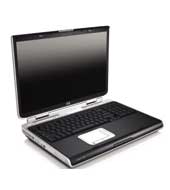
Yes, a humbly notebook she is. Her name's HP zd8342ea notebook, she just turned 7 months old, born last November 2005 in Dubai DutyFree Shopping mall, took me years of dreaming these wonderful moments with her. A breed from Hewlett Packard Pavillion clan, that has roamed mountains of companies around the globe and still achieving continuous credibility of satisfactory-producing genes commonly distributed throughout these technology lands.
I still remember...
Three hours of pain-staking walking labor inside DDFS mall, trying to choose which one would capture my very own dull mind and would inevitably convince me of these feature-enriched built-in choices of factors that were all overly up close and personally displayed.
Never mind the once-in-a-lifetime millionnaire coupon ticket that comes with her as this predefined non-production notebook customizations, that was amazingly-built, has provided me endlessly joyful sleepless nights, awakening my sleeping molecular bed of thinking-cells during those months of stay with her....
Have served her my best. Have spoonfed her different operating systems distro, customization setups targeted on gaining maximized resource throughput as well, 11 burning OS to be precised. It was fun feeding her dumb hungry-liking interrupts and data sockets with 1s and 0s. Reviving her empty memory and non-colliding hyperthreaded-enabled processors was unimaginable happy hours. On which, returns all favor to her during these six months...and I must admit, yours truly is a sole witness here.
Sad but true.
My desires and interests of letting her go for adoption at her early age was not an easy one for me.
SOLD!
My HP zd8342ea (series 8000), farewell then...I'll see you at cyber space!
Her at a Glance :
HP Pavilion zd8342EA Notebook PC (EL028EA#ABV)
Microsoft® Windows® XP Home Edition
supporting Hyper-Threading Technology, Intel® SpeedStep® technology
3.20 GHz
512 MB
80 GB
DVD Writer Dual Format (+/-R +/-RW) with Double Layer support
ATI MOBILITY RADEON X600 graphics
12-cell Lithium-Ion (Li-Ion) battery
54g™ 802.11b/g WLAN
290 mm (L) x 398 mm (W) x 50 mm (H)
4.22 kg (9.3 lbs)
Inner ones, specs and details:
Processor, Operating System and Memory
Operating System Installed
By Default: Microsoft® Windows® XP Home Edition
Current: Fedora Core Linux 5, PCLinux OS 0.92, Ark Linux beta RC2
Processor
Intel® Pentium® 4 Processor 640
processor technology
supporting Hyper-Threading Technology, Intel® SpeedStep® technology
processor speed
3.20 GHz
System Bus
800 MHz Bus speed
Cache
Level 2 cache 2 MB
Standard Memory
512 MB upgradeable to 2GB
Memory Type
DDR2 533 MHz
memory layout
(2 x 256 MB)
Maximum Memory
Supports up to 2 GB DDR2 memory
Internal drives
Internal Hard Disk Drive
80 GB
Hard disk controller
EIDE hard drive, ATA 100
Hard Disk Drive Speed
4200 rpm
optical drive type
DVD Writer Dual Format (+/-R +/-RW) with Double Layer support
System features
Memory card device
Digital Media Reader (6 in 1) (xD, SD, Smart Media, Memory Stick, Memory Stick Pro, Multimedia Card)
External drive bays
HP USB Digital Drive
Network interface
10/100 LAN Ethernet integrated
Wireless Technologies
54g™ 802.11b/g WLAN
Wireless capability
Bluetooth® wireless networking
External I/O Ports
1 VGA port; 4 USB 2.0 ports; 1 IEEE-1394; 1 RJ 11 modem connector; 1 RJ 45 Ethernet connector; S-video TV out; Remote control infrared port (Remote Control optional); 1 Headphone-out, 1 Microphone-in ports; Cable docking connector
video capture interface
IEEE 1394 Interface
Expansion Slots
One ExpressCard/54 slot (also supports ExpressCard/34)
Display size
17" WXGA+ High Definition BrightView Widescreen
Display resolution
1440 x 900
Video adapter
ATI MOBILITY RADEON X600 graphics
Video RAM
128 MB dedicated video memory
Video adapter, bus
PCI Express®
Handheld Remote Control
HP Mobile Remote Control
Internal Audio
3D Sound Blaster Pro compatible sound 16 bit integrated
Speakers and microphone
Altec Lansing® speakers
power supply type
180 W AC Power Adapter
Battery Type
12-cell Lithium-Ion (Li-Ion) battery
Software
Software - Productivity & Finance
Microsoft® Works 8.0
Included/Pre-installed Software
Microsoft® Internet Explorer 6.0; Microsoft® Outlook® Express; Adobe® Reader 5.0
optical drive driver software
InterVideo WinDVD 5.0; Sonic™ Digital MediaPlus 7.0: Sonic™ RecordNow; Sonic™ MyDVD; Sonic™ Easy Archive; Sonic™ Express Labeler; Microsoft® Windows® Media Player 10; Apple iTunes; Apple QuickTime; HP Image Zone Plus
Software - Education / Reference / Entertainment
InterVideo Home Theater™
Software Included
Symantec™ Norton Internet Security™ 2005 (60-day liveupdate); Notebook Help & Support
dimensions / weight / warranty
Weight
4.22 kg (9.3 lbs)
Dimensions (w x d x h)
290 mm (L) x 398 mm (W) x 50 mm (H)
Maximum Dimensions (W x D x H)
465 x 190 x 365 mm
Toshiba, here I come.
in life:
Happy with HP,..now let us see the world from Toshiba...
Saturday, June 24, 2006
useful health trivia
*
One cigarette can destroy 25-100 mg of Vitamin C.
*
Most store-bought milk with synthetic Vitamin D added can rob the body of magnesium.
*
Elderly people do not get enough Vitamin D due to lack of exposure to the sun.
*
Oral contraceptives interfere with the extraction of Vitamin C, B6, B12, folic acid from most diets.
*
Children need more protein than adults (about 11/2-2 times more per pound of body weight), and babies require three times more.
*
Daily "happy hours" can rob the body of Vitamin C and B.
*
The immune system will be depressed from constant consumption of foods with monosodium glutamate or vetsin, artificial colors/flavors, preservatives and other additives.
*
Raw peanuts have enzyme inhibitors that make it difficult for the body to digest all kinds of protein.
*
Natural fat (saturated fat) is better for the body than hydrogenated fat (found in low-fat butter substitutes like margarine). Hydrogenated oil is a trans fatty acid that has been linked to cancer.
*
Vitamin B1 can ease sea and air sickness.
*
Carpal tunnel syndrome and hormonal imbalance could indicate Vitamin B deficiency.
*
Magnesium is a muscle relaxant and is considered nature's equivalent of calcium channel blocker drugs.
*
The United States Department of Agriculture Human Nutrition Research Center on Aging at Tufts University says daily consumption of Vitamin C supplements have been found to reduce the risk of developing cataracts.
*
For more brain power, 100 mg of the phospholipid supplement phosphatidyl serine (PS) daily is suggested. It can help those with normal age-related memory problems regain at least 12 years of brain power.
*
Recent studies have shown that the mineral selenium may significantly slow the progression of the human immunodeficiency virus (HIV), which causes the acquired immune deficiency syndrome (AIDS).
*
Flavonoids found in red grapes can be 1,000 times more powerful than Vitamin E.
*
People who consume nuts five or more times a week have a lower risk of developing heart disease compared to those who eat nuts less than once a week.
*
Drinking soda and eating foods with sugar substitutes stimulate the body to consume more fat.
*
An onion a day keeps stomach cancer away. Onion's allylic sulfides (anti-cancer compounds) activate enzymes that neutralize cancer-causing substances.
*
Many people lose enzymes necessary to digest milk after the age of 12. This is why adults suffer from lactose intolerance, like having gas/indigestion, after drinking milk.
*
Taking Vitamin E supplements can lower the risk of heart disease.
*
The American Cancer Society says new studies reveal that the life expectancy of non-smokers can be longer by 18 years compared to smokers.
*
Boron can be a woman's best friend. The trace-mineral (found in apples, grapes, raisins) may retard bone loss in women after menopause. It also helps women on ERT (estrogen replacement therapy) by keeping estrogen in the blood longer.
*
The swallowing of toothpaste should be avoided as there may be a connection between the oral hygiene product (with its additives) and bowel diseases.
*
Aspirin may triple the rate of the body's release of Vitamin C.
Calmness:
style="font-family:verdana;">Walk with purpose but with calmness. Speak with passion but with peace. Act with energy but with serenity. These are the ways to manage the forces within you, using them not against but together with the flow of life.
Choose an affirmation each morning to start your day with inspiration not aggravation.
Breathe in a relaxed manner. Close your eyes and affirm: "I walk with the Spirit today." Visualize yourself bathed in brilliant white light.
Calming drink:
Take a hot or chilled cup of peppermint tea. For extra energy, add a slice of fresh ginger for that zing.
Love and light!
Tuesday, June 20, 2006
google spreadsheet now

How do you create, edit, share spreadsheet from the internet?
Now, introducing Google spreadsheet!
Duh, tell me more about it dude.
Get started quickly. Import your existing spreadsheets or create new ones from scratch.
Edit your spreadsheets from anywhere. All you need is a Web browser - your spreadsheets are stored securely online.
Share changes in real-time.Invite people to your spreadsheets and make changes together, at the same time.
Tuesday, June 13, 2006
bird's eyeview - google earth
i was evaluating google's latest google earth. glad they release a linux version.
it was amazing trip, moving around earth's X and Y axis. a virtual trip you cant get
just around it and spend a couple of hours looking to places, buildings and maps.
What is Google Earth anyway?
It is Explore, Search and Discover.
Nice, so any other definitions that I can simply understand?
Google Earth puts a planet's worth of imagery and other geographic information right on your desktop. View exotic locales like Maui and Paris as well as points of interest such as local restaurants, hospitals, schools, and more.
You can actually pinpointed and marked your own point of residence, your school, its there and updated!
When are these maps and pictures updated from Google Earth?
Three years ago taken from satellite and some aerial flights above.
As you will notice, most maps were taken at a very early time of the day.
What?! I need the hardware requirements?
Yep, just copy and paste it.
What are you talking about?
Here.
Google Earth takes advantage of the 3D graphics capabilities standard on most computers. If you are using Google Earth on an older machine, or a notebook computer that does not have 3D graphics capabilities, you may not be able to run the application.
The 3D graphics capabilities of your machine have a lot to do with how well Google Earth performs. Google Earth will work on most graphics cards from the following manufacturers:
NVIDIA
ATI*
3D Labs
Intel**
Matrox
S3
* The following ATI cards are not supported: ATI Rage Mobility, ATI Xpert, ATI 3D Rage.
** Intel 3D graphics machines can use the default OpenGL version, but work better in DirectX (choose Start > Programs > Google Earth > Start Google Earth in DirectX).
Matrox card users must use the OpenGL version. S3 cards must use the DirectX version.
See my attached google earth captured point of residence back home!
Thanks.
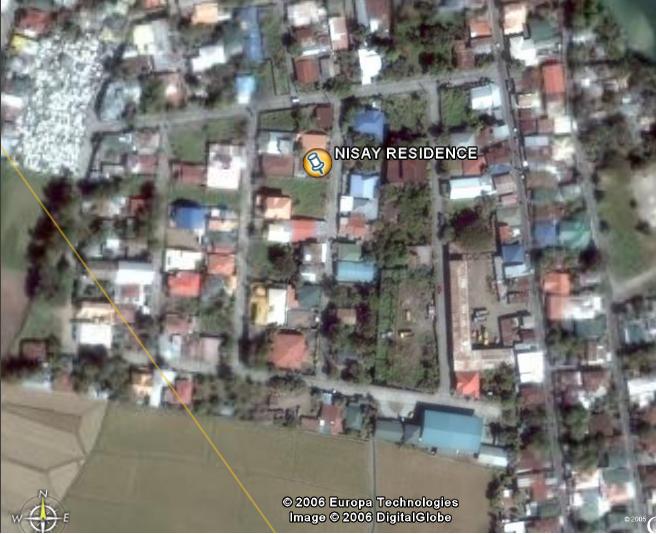
Links: Google Earth http://earth.google.com/faq.html#1
in life: unidentified aliens are providing google amazing technology!
Sunday, June 11, 2006
novell xgl demo tube
Below is Novell XGL tube demo. If you are using a dialup-like internet connectivity, it is not advisable for you to play the demo tube by Novell, however, if you havent seen one XGL 3d desktop demo under Novell Linux, just be patient and click play now.
Friday, June 9, 2006
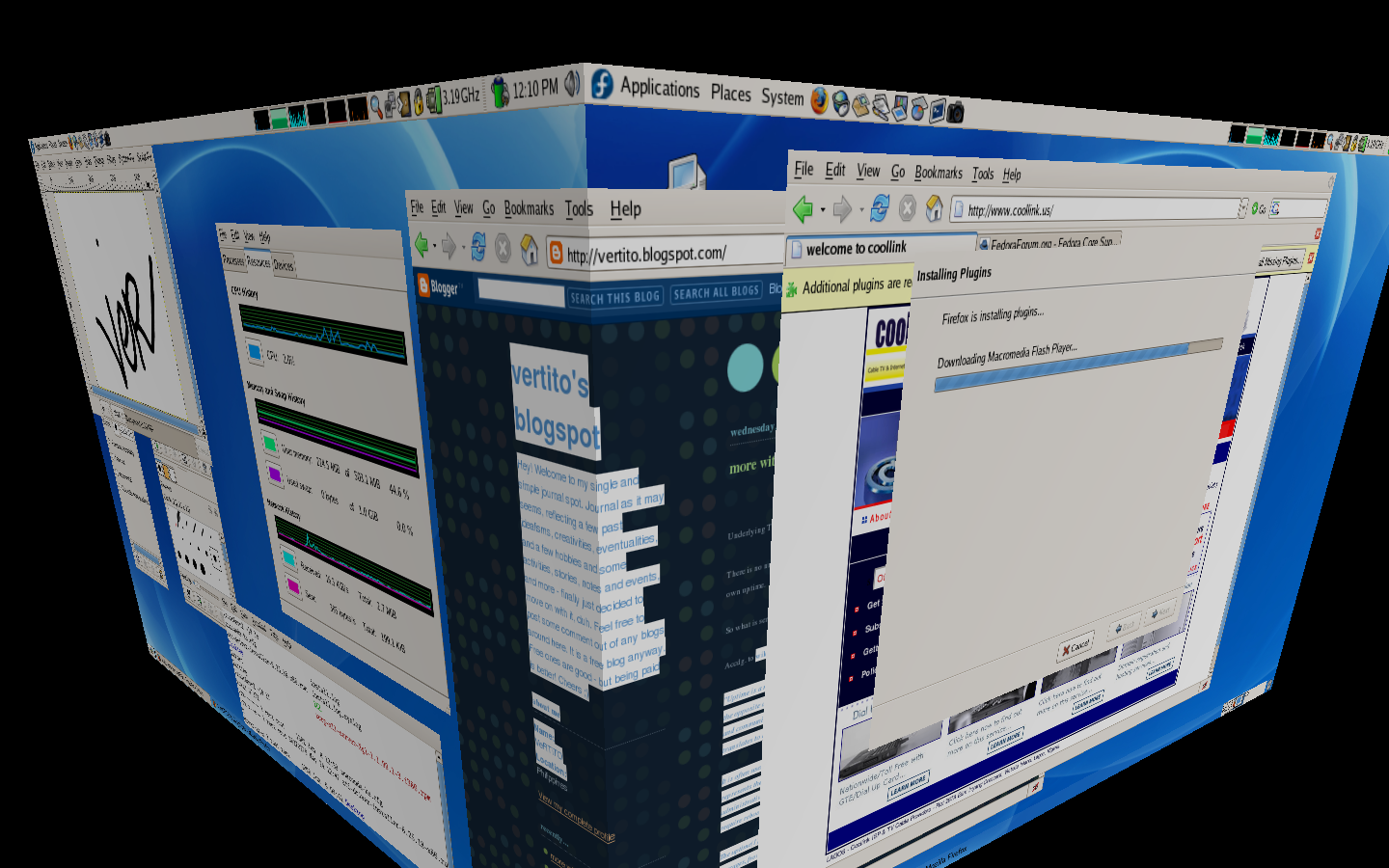
my 3d xgl screenshots
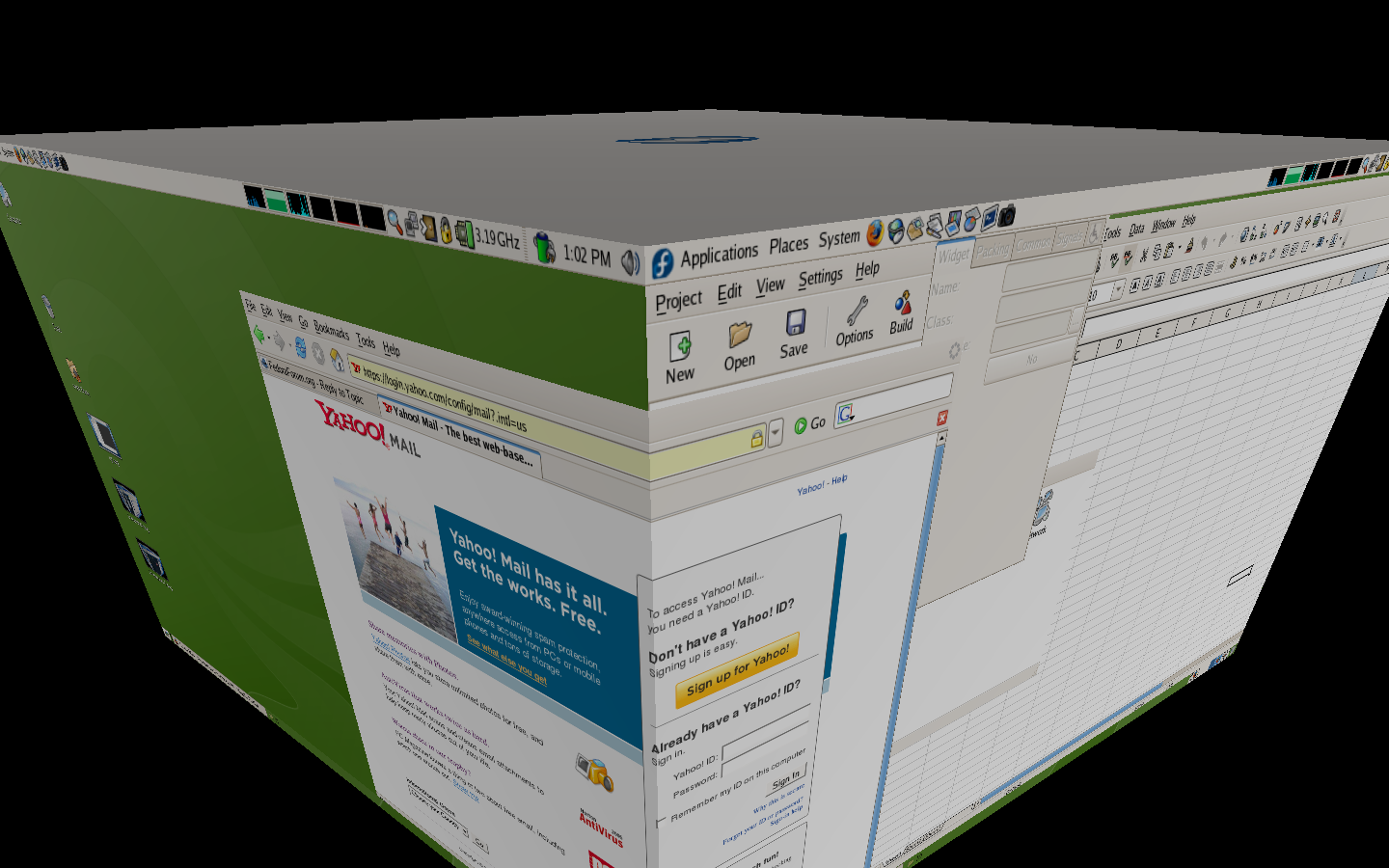
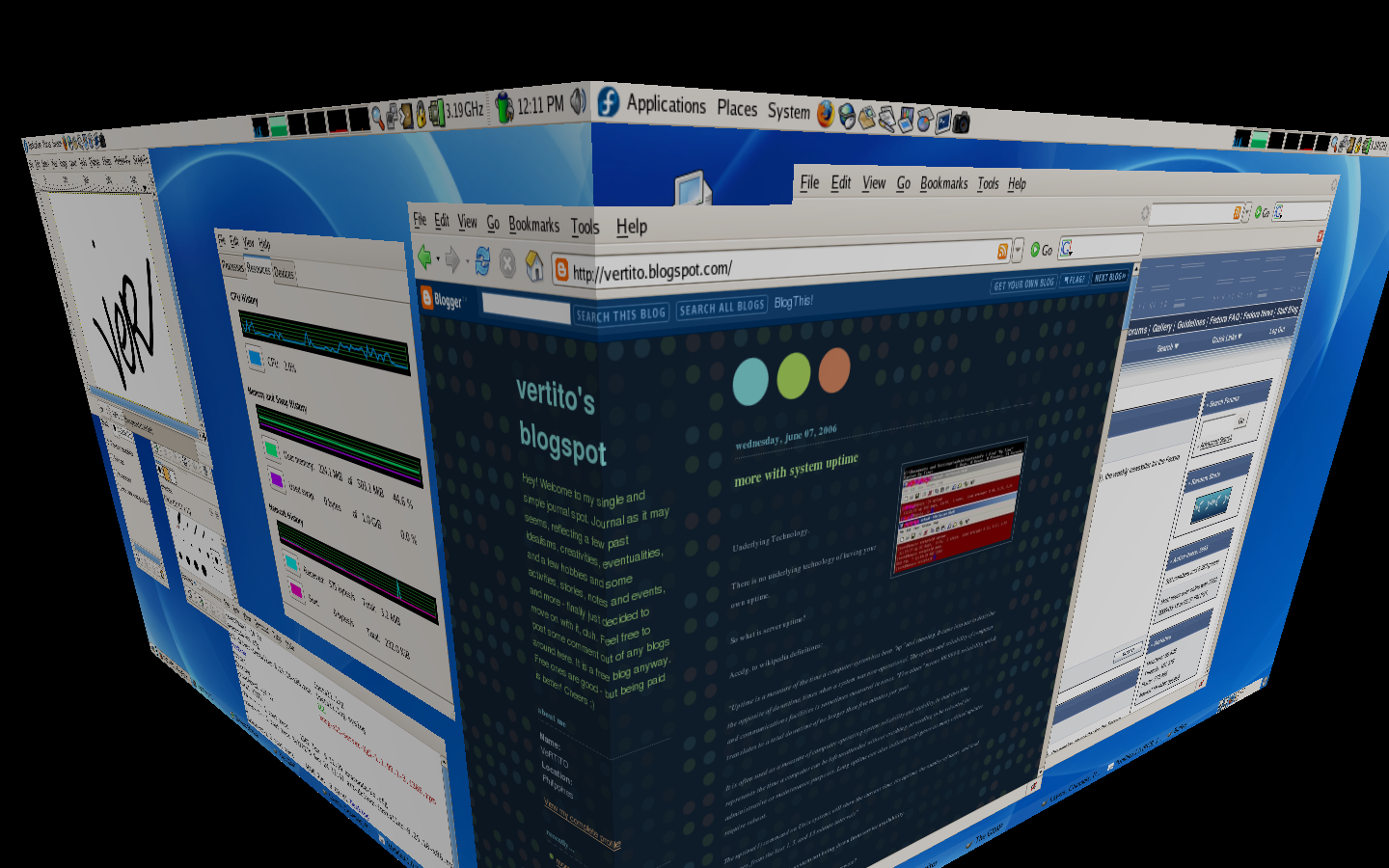
Introduction:
XGL Code:
See how to do that here http://www.fedorafaq.org/#radeon
How do I enable 3D support for my nVidia graphics card in Fedora Core 5?
Link here http://www.fedorafaq.org/#nvidia
Major XGL desktop features:
1. True transparency and shadow
2. Zoom In / Zoom out
3. Desktop Organization
4. 3d Spinning Cube
5. Moving-film like
Package list to install:
compiz OR compiz-quinn
xorg-x11-server-Xgl
fedora-xgl-settings
gset-compiz
xgl-hardware-list
glitz
libsvg-cairo libsvg
Let's go install. Show me now please.
First, make sure you have a 3d vga driver working already and the latest kernel.
Now, for this to work under FC5, you need to install Fedora Xgl Repository as root, issue:
Then import proper GPG key
# rpm --import /etc/pki/rpm-gpg/RPM-GPG-KEY-AL-CAPCOM
Follwed by installing Xgl and Compiz rpm packages:
# yum --enablerepo=fedora-xgl install compiz xor-x11-server-Xgl
Verify that you have the correct xgl values after the installation:
$ gnome-xgl-info
This command must return results like this:
G nVidia Corporation
1 kmod-nvidia is installed for the kernel release 1.2111_FC5
1 -accel glx:pbuffer -accel xv
Enable Xgl:
gnome-xgl-switch --enable-xgl --auto
When the script ask you for applying the modifications, say (y)es.
To disable Xglgnome-xgl-switch --disable-xgl
Use Gnome, for now, it doesnt work with KDE yet.
Modify your /etc/gdm/custom.conf and append these :
[servers]0=Xgl
[server-Xgl]
name=Xgl
servercommand=/usr/bin/Xgl :0 -fullscreen -ac -accel glxbuffer -accel xv:buffer
chooser=false
handled=true
flexible=true
priority=0
And save.
**Note that /usr/bin is the location, others had /opt/bin.
XGL is not yet fully stable, its still on development process and most users from different distros find hardtimes doing the installation. Once or twice it would work for them, but after reboot, it does not!
Then, create a executable bash scripts named XGL like below. This one would launch XGL under init 3 properly.
#/bin/sh
#start XGL on display :1
export DISPLAY=:1<
br />/usr/bin/Xgl :1 -ac -accel glx:buffer -accel xv:buffer -fullscreen &
sleep 33
#start compiz
DISPLAY=:1 /opt/Xgl/bin/compiz gconf &
DISPLAY=:1 gnome-window-decorator &
DISPLAY=:1 dbus-launch gnome-session &
#avoid backspace to kill Xgl
DISPLAY=:1 /usr/bin/xmodmap -e "keycode 22 = BackSpace"
And save.
Change /usr/bin if necessary. This one comes from my own settings though. You will notice sleep 33 is there, it works for me, if I changed that to sleep 10, it wont do the work, you need to give it some loading time, maybe 60 would do for some slower systems as I have 3.2 GHz processor here, 33 is just fine for me.
Then from Gnome, click Administration, look and click for Compiz configuration, from the left pane of the newly appeared dialog box, make sure the following plugins are checked:
gconf
decoration
wobbly
fade
minimize
cube
rotate
zoom
scale
move
resize
place
switcher
Reboot to init 3, and run the XGL script as root, wonderful, works like a charm!
The above worked with my ATI Mob Radeon X600 with 128 dedicated video mem running under FC5.
If you wish to run it when Gnome is loaded, change the display redirection from :1 to :0, edit /etc/inittab to init 5, and do some tweakings from your xorg.conf, gnome-sessions and startup programs.
Some sweet-candy XGL keyboard shortcuts commands:
Ctrl+Alt+Left - rotates the 3d cube going to the left.
Ctrl+Alt+Right - and right ofcourse.
Alt+Left Button - drags the currently selected window with effects
Ctrl+Alt+Left Button - rotates the cube on mouse directionand more!
Lastly, find an internet cafe, do some show offs. LOL
Future Readings:
http://www.novell.com/linux/xglrelease/
http://en.wikipedia.org/wiki/Xgl
http://fedoraforum.org
http://www.freedesktop.org/wiki/Software/Xgl
All their trademarks and licenses.
in life: desktop linux are getting more and more sweet nowadays
Wednesday, June 7, 2006
more with system uptime
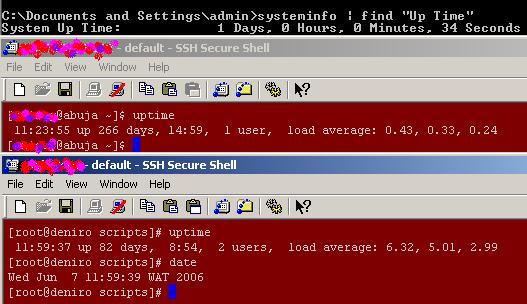
Underlying Technology.
There is no underlying technology of having your own uptime.
So what is server uptime?
Accdg. to wikipedia definitions:
"Uptime is a measure of the time a computer system has been "up" and running. It came into use to describe the opposite of downtime, times when a system was non-operational. The uptime and reliability of computer and communications facilities is sometimes measured in nines. "Five nines" means 99.999% reliability, which translates to a total downtime of no longer than five minutes per year.
It is often used as a measure of computer operating system reliability and stability, in that this time represents the time a computer can be left unattended without crashing, or needing to be rebooted for administrative or maintenance purposes. Long uptime can also indicate negligence as many critical updates require reboot.
The uptime(1) command on Unix systems will show the current time, the uptime, the number of users, and load averages, from the last 1, 5, and 15 minute intervals"
Basically, its a counter of a system not being down from service availability.
So how can I get my own uptime? Is it free? Shareware?
It's free, its already there, just turn on your system.
Show me please.
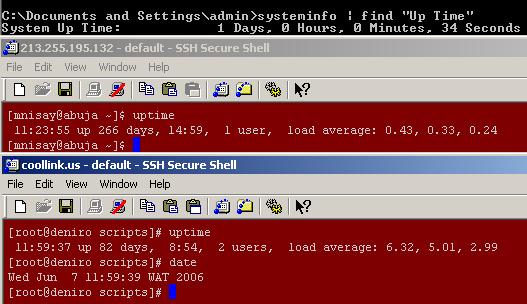
Easy, even newbies, noobs can easily know his system or server uptime. If you are using Window$ XP, it doesnt matter if its genuine or not, nor internet-connected or not, as long as you have remote or physical admin access on it. You simply launch the infamous DOS command prompt and issue:
C:\systeminfo find "Up Time"
This command will seize all vital hardware details including OS components version and updates. But since it includes parsing 'find' command, it will just show you your XP uptime.
How to launch DOS. Click Start, Run, and type "cmd" and hit OK!
With Linux, simply issue, root or normal user:
#uptime
What else?
There are lots of site offering free uptime monitoring service. Netcraft is one famous among them. You can see netcraft uptime server here http://uptime.netcraft.com
State your point!
Oh sorry, let' see.
My current uptime is 266 days under FC and 1 day with window$ XP, see screenshot.
Last year was like 345 days, restarted by epileptic UPS arg!
Based from uptime netcraft, current longest uptime is 1461 days running under BSD OS and 50th highest uptime is 768 days as of today, 11AM GMT.
Further reading: Google defines it here
Life: uptime is alive but doesnt breath!
More: graph it using MRTG
not to much to create and append, ..
maintenance are on automatic mode,
now more on monitoring and see how it looks, ..
browse the net, home sweet home is coming soon!
Saturday, June 3, 2006
ATI Radeon X600 3d FC5 Howto
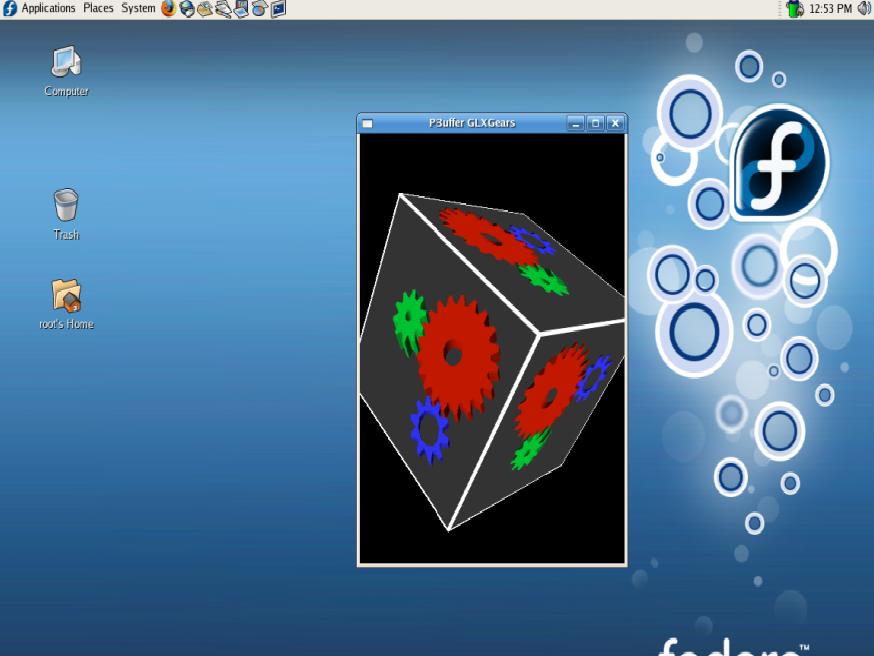

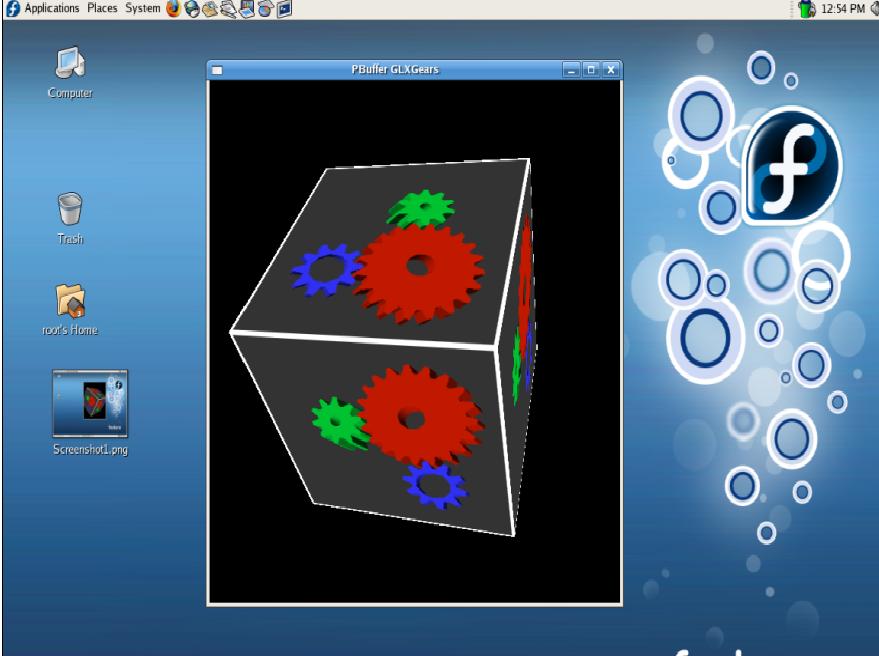
Under Fedora Core OS distro, there has been many forums and plug list discussions about their problems and experience of having NVidia and ATI video card driver working with their system, specially to 3d-enabled VGA support.
Show your point!
Last night, I did a full dual boot reinstall of my notebook, FC 5 and XP2, for beginners and hobbyist just in case when the need arises.
Where did you get your ATI Radeon X600 driver?
Enriched packages with yum repos for FC distro leads me unto it.
Before you do this, make sure you already made a backup copy of your /etc/X11/xorg.conf.
As root with SELinux disabled,
#yum install kmod-fglrx
For some dependencies from your system, this may install necessary kernel upgrades for your system. Note that fglrx driver wont work without the needed current kernel updates, unless you compile it yourself! If you dont feel happy upgrading your kernel to latest one, you have an option to press N to cancel everything when prompted.
However, if you choose to continue, this command will install the open source fglrx non-propriety software package that works with most ATI video cards and will provide your with 3D acceleration support for most intel chips.
What about NVidia video card drivers, almost the same approach.
#yum install kmod-nvidia
If you have ATI cards, don't ever issue the above one. You might get confused.
If SELinux is enabled, simply issue as root,
setsebool -P allow_execmod=1
Check /etc/selinux/config if you dont know your SELinux status.
Noticed from xorg.conf a few modifications like
Driver "fglrx"Option "UseInternalAGPGART" "no"
Make sure you also set your default screen reso there just down below of that lines.
Reboot.
How can I see that 3d gears graphics working?
Issue
#fgl_glxgears
and screen-capture it. Works like a charm!
Now check out its performance, go and play heavy 3D games! Ever heard of XGL or 3d desktop? Try that!
For debug purposes,
tail -f /var/log/messages
If it doesnt work for your OS, just copy back your /etc/xorg.conf.backup copy and overwrite the xorg.conf. You may need to restart GDM by logging out. Or alternatively, hit Ctrl+Alt+Backspace to restart X. No need to reboot.
See some captured desktop I have. Useless pretry candies huh.
For ATI feedback, see http://apps.ati.com/linuxDfeedback/index.asp
For Livna repos, see http://rpm.livna.org/
SELinux, see http://fedora.redhat.com/docs/selinux-faq/
See Fedora Forums
Thursday, June 1, 2006
shutdown using non-root
How to enable a non-root user to shuwdown a linux system
First, you need a non-root user, go and create it using root account
[root@deniro ver]# useradd -d /home/vertito vertito -s /bin/bash && passwd vertito
This would create a new bash-enabled user prompting you for a new password.
You then edit /etc/sudoers file by launching your favorite editor like so
[root@deniro ver]# nano -w /etc/sudoers
or simply
[root@deniro ver]# visudo
and inserting
SHUTDOWN localhost=/sbin/shutdown -h now
and save.
Logout as root and login as user vertito. User vertito was the last user created a while ago.
[vertito@deniro ~]$ /sbin/shutdown -h now
Just make sure /sbin/shutdown is world readable and executable as mine is not! !
Further readings:
man sudo
man shutdown
man sudoers
sources: WWW
application: dont reboot, shut it down, makes work simple!
VNC server howto
A brief VNC howto introduction:
What is VNC?
VNC stands for Virtual Network Computing. It is remote control software which allows you to view and interact with one computer (the "server") using a simple program (the "viewer") on another computer anywhere on the Internet. The two computers don't even have to be the same type, so for example you can use VNC to view an office Linux machine on your Windows PC at home. VNC is freely and publicly available and is in widespread active use by millions throughout industry, academia and privately.
VNC server Howtos in Fedora Core OS.
Do yout think I have it in installed from my system?
Type the following command to check if you have the client and server installed from your system.
As root
[root@deniro mail]# rpm -qa vnc vnc-server
vnc.i386.4.1.1-10.1
vnc-server.i386.4.1.1-10.1
Or as non-root user
[vertito@deniro ~]$
vnc.i386.4.1.1-10.1
vnc-server.i386.4.1.1-10.1
If it's not yet installed, you can install it using the easy to use yum command.
[root@deniro mail]# yum install vnc-server
Now, to configure vncserver as a service on your system, add yourself in following config file.
[vertito@deniro ~]$ sudo vi /etc/sysconfig/vncservers
# VNCSERVERS="1:myusername"
VNCSERVERS="1:vertito"
To add more users
VNCSERVERS="1:vertito 2:ver"
OPTIONAL:
VNCSERVERARGS[1]="-geometry 1024x768 -depth 16"
VNCSERVERARGS[2]="-geometry 800x600 -depth 8"
Before starting vncserver as a service, let's create a vnc password with vncpasswd command.
Notice it creates a hidden directory .vnc under your home account with file passwd which contains your vnc password.
[vertito@deniro ~]$ vncpasswd
Password:
Verify:
[vertito@deniro ~]$ ls -d .vnc
.vnc
[vertito@deniro ~]$ ls .vnc
passwd
[vertito@deniro ~]$
Now let's start vncserver as a service.
[vertito@deniro ~]$ sudo /sbin/service vncserver start
Starting VNC server: 1:vertito [ OK ]
[vertito@deniro ~]$
Take a look at the contents of .vnc directory now. You should have something similiar to following.
[vertito@deniro ~]$ cd .vnc
[vertito@deniro ~]$ ls
passwd vertito:1.log vertito:1.pid xstartup
[vertito@deniro ~]$
If you edit the script called xstartup, you will see UNSET SESSION_MANAGER 2 lines,
uncomment those two lines! Otherwise, you will get nothing but grey screen.
#!/bin/sh
# Uncomment the following two lines for normal desktop:
unset SESSION_MANAGER
exec /etc/X11/xinit/xinitrc
[ -x /etc/vnc/xstartup ] && exec /etc/vnc/xstartup
[ -r $HOME/.Xresources ] && xrdb $HOME/.Xresources
xsetroot -solid grey
vncconfig -iconic &
xterm -geometry 80x24+10+10 -ls -title "$VNCDESKTOP Desktop" &
twm &
After editing vnc startup script, we need to restart the vncserver service
[vertito@deniro ~]$ sudo /sbin/service vncserver restart
Shutting down VNC server: 1:vertito [ OK ]
Starting VNC server: 1:vertito [ OK ]
[vertito@deniro ~]$
So how do I connect to vncserver?
Use vncviewer command in vnc client as following.
[vertito@deniro ~]$ vncviewer localhost:1
Enter your password there.
General usage is:
vncviewer [Server's IP]:[Port]:[Display]
To connect to a remote system with iptables firewall, port 5901 needs to be open.
Add following line to open port 5901 and restart iptables service.
-A RH-Firewall-1-INPUT -m state --state NEW -m tcp -p tcp --dport 5901 -j ACCEPT
/sbin/service iptables restart
If you have 2 users, you may
-A RH-Firewall-1-INPUT -m state --state NEW -m tcp -p tcp --dport 5901:5902 -j ACCEPT
These would listen on ports 5901, 5902 respectively.
And restart again the following services,
/sbin/service iptables restart
/sbin/service vncserver restart
To load vncserver during reboot, add as startup service
#chkconfig vncserver on
To know vnc-server status
/sbin/service vncserver status
Basically, this is it. You are happy to go!
Further Reading
Read the man pages. Everything is in there:
man vncserver
man Xvnc
man vncconfig
man vncviewer
VNC with SSH. See http://www.ltsp.org/contrib/vnc.html
sources: Fedora, Fedora Forum, Fedora FAQ, Google
life:
teleportation is a must
Trademarks are their own copyrights.

Make Money


Live Traffic
