Yey! Silverlight does work on Fedora 22.


To get most hardware specifications of your desktop using Fedora 14
# yum install lshw
Usage:
# lshw -short -class disk
# lshw -short -class memory
# lshw
With all the latest open source software and major improvements to graphics support, networking, virtualization and more, Fedora 12 is one of the most exciting releases so far. You can download Fedora 12 here. There's a one-page guide to the new release for those in a hurry.
The full release announcement has details on the major features, and the release notes contain comprehensive information on changes in this new release. Known issues are documented on the common bugs page."
PHP supports libcurl that allows you to connect and communicate to many different types of servers with many different types of protocols.
libcurl currently supports the http, https, ftp, gopher, telnet, dict, file, and ldap protocols. libcurl also supports HTTPS certificates, HTTP POST, HTTP PUT, FTP uploading, HTTP form based upload, proxies, cookies, and user+password authentication.
Here's a quick scan of how I just wasted several days and couple of hours trying to integrate simple PHP curl codes with existing API backends from Enom and Namecheap. Currently Namecheap does not have publicly available integration interface that is as simple as 1-2-3 site installation.
Now the fun begins.
$url = 'API server host';
$curl;
$curl = curl_init();
curl_setopt($curl, CURLOPT_CONNECTTIMEOUT, 2);
curl_setopt($curl, CURLOPT_HEADER, false);
curl_setopt($curl, CURLOPT_RETURNTRANSFER, 1);
curl_setopt($curl, CURLOPT_HTTP_VERSION, CURL_HTTP_VERSION_1_1);
curl_setopt($curl, CURLOPT_URL, $url);
$result = curl_exec($curl);
curl_close($curl);
header('Content-Type: application/xml; charset=ISO-8859-1');
print $result;
By default, curl makes use of HTTP-GET unless explicitly specified to be false and as HTTP-POST method.
This PHP codes simply checks a specified particular domain TLD via PHP form, for the possibiblity of domain existence. That's it. As we all know, the free WHOIS and DOMAINTOOLS servers are limited by request for security reason, that is why this code has been created for some time. Note that the return results from Namecheap API server https://api.sandbox.namecheap.com comes in XML format.
Probability is, this is the same approach that has been utilized for desktop and web applications like twitter, entrecard, myblog, and even YMail and GMail - the difference is that the front-end differs, where a few of them enjoyed more of AJAX and SOAP. :) The rest are PHPs.
Furthermore, these codes can also be expanded to actually register domains, and even have a full-pledged DNS control and management system acting as domain registrar platform, like Godaddy, Namecheap, Onlinenic and Enoms.
For the docs.
Have you ever needed a tool that converts HTML source files, into indexed HTML, or adobe postscripts or even to adobe PDF files? Here's a quick post on how to convert HTML files into indexed HTML, postscript or adobe PDF file.
What is HTMLDOC?
HTMLDOC converts HTML source files into indexed HTML, PostScript, or Portable Document Format (PDF) files that can be viewed online or printed. With no options a HTML document is produced on stdout. The second form of HTMLDOC reads HTML source from stdin, which allows you to use HTMLDOC as a filter. The third form of HTMLDOC launches a graphical interface that allows you to change options and generate documents interactively.
HTMLDOC converts Hyper-Text Markup Language ("HTML") input files into indexed HTML, Adobe® PostScript®, or Adobe Portable Document Format ("PDF") files.
HTMLDOC supports most HTML 3.2 elements, some HTML 4.0 elements, and can generate title and table of contents pages. The 1.8.x releases do not support stylesheets. HTMLDOC can be used as a standalone application, in a batch document processing environment, or as a web-based report generation application.
How To Install HTMLDOC into Fedora 11?
HTMLDOC Installation on Fedora
HTMLDOC is supported by Fedora 11 yum repos. To install, simply
# yum -y install htmldoc
The above command will also install C++ user interface toolkit called fltk.
HTMLDOC Usage
Executing HTMLDOC binary launches a GUI window where in you can customize its default settings and feed in the required input files and eve specify the output file as shown from the captured HTMLDOC window below
# htmldoc
In order to instal Flash on 64-bit Fedora 10 linux, here's a quick guidelines on how to install macromedia flash x64 to Firefox under Fedora 10 OS.
Fedora 10: How To Install Flash x64 with Firefox
1. Download Sun Java's Linux x64 bit rpm here.
2. Chmod 700 jre-6u13-linux-x64-rpm.bin
3. ./jre-6u13-linux-x64-rpm.bin
The above now shows the License and Agreement. Press 'q' to proceed and type 'yes' to agree.
4. Issue these commands.
# update-alternatives --install "/usr/bin/java" "java" "/usr/java/jre1.6.0_12/bin/java" 20000
# update-alternatives --set java /usr/java/jre1.6.0_12/bin/java
# ln -sf /usr/java/jre1.6.0_12/lib/amd64/libnpjp2.so /usr/lib64/mozilla/plugins/
# mozilla-plugin-config -g -c -v
5. Restart Firefox and head on here to test your Sun Java's Fedora 10 installation.
6. To verify Mozilla plugin integration, type
about:plugins
from the address bar and confirm that you are seeing lines as shown:
libnpjp2.so
File name: libnpjp2.so
MIME Type Description Suffixes Enabled
application/x-java-vm Java Yes
application/x-java-applet Java Yes
application/x-java-applet;version=1.1 Java Yes
application/x-java-applet;version=1.1.1 Java Yes
Works great.
I was crawling from youtube's side by side linux videos and suddenly, as we always expect it, wonder video comes along. Here's a side by side boot sequence video comparison of the upcoming Fedora 11 and Ubuntu 9.04 distributions.
Chris goes over some of the top features of the Fedora 10 release. He addsvisual overviews of some of the new improvements!
Here's an in depth Fedora 10 preview being discussed by two different fedora minds. Currently being previewed for more than 39,000 times from Youtube. Click PLAY to view.
An interview with Linus Torvalds in which he talked about what he likes and doesn't like in a Linux distribution
AMD finally fleshed out the "Asset Smart" strategy it has been talking about since, at least, last December. The result: AMD is now fabless.
David Axmark, a cofounder and former lead engineer for MySQL, has resigned from Sun Microsystems a few weeks after another cofounder said he may also leave the company.
Novell’s Mono project has been chasing Microsoft’s .NET Framework since its inception. In a turnabout, Novell now intends to standardize some innovations that it developed during the course of its work toward parity with .NET 2.0, leaving Microsoft to follow Mono.
A reliable network monitoring and management solution must accurately detect network devices such as routers, servers, and client workstations. It must be able to display a map of the whole network, monitor the health and performance of each device, and have a way to notify someone of a problem by email, text message, or other form of communication. It should be able to fix a problem by restarting services or running specific programs. It should generate detailed reports that you can analyze easily to help prevent future incidents. Finally, a decent monitoring system must be easy to use, deploy, and customize according to your monitoring needs. Let's use these standards to see if GroundWork Monitor Community Edition is up to the task.
Linux Format: "Looking to make your Perl code more re-usable and easier to maintain? Juliet Kemp explains how to create, build and install your own Perl modules, and it's not as difficult as you might think..."
AppDeploy, an online community for both systems management professionals and application and computer administrators has released a free software tool called "AppDeploy Repackager." The tool is the industry's first free application dedicated to the complex task of Windows Installer repackaging, according to the company. Software developers use a repackager to generate a custom, silent installer based on changes that are made to a system when installing and configuring software.
The UI has been radically redesigned. I have always liked Ubuntu Tweak's looks. The current redesign makes Ubuntu Tweak look very sleek and modern. Here's a screen shot:
A vendor of Java-based POS (point-of-sale/service) software for the hospitality industry applications is touting wireless Linux netbooks as POS terminals. Volante says Linux netbooks are "more cost effective, flexible, and allow for greater freedom of choice in software," compared to traditional restaurant order-entry handhelds.
The largest conference devoted to Linux technology is changing its name to embrace open source software on other operating systems (OSes). Next August, LinuxWorld will relaunch as the OpenSource World Conference & Expo, but will retain existing LinuxWorld features, says show organizer IDG World Expo.
A popular free security tool for the Firefox browser has been upgraded to block one of the most dangerous and troubling security problems facing the Web today.
Wikia co-founder Angela Beesely has been selected as a keynote speaker at the upcoming Linux.conf.au 2009 National Linux Conference.
Wikia co-founder Angela Beesely has been selected as a keynote speaker at the upcoming Linux.conf.au 2009 National Linux Conference.
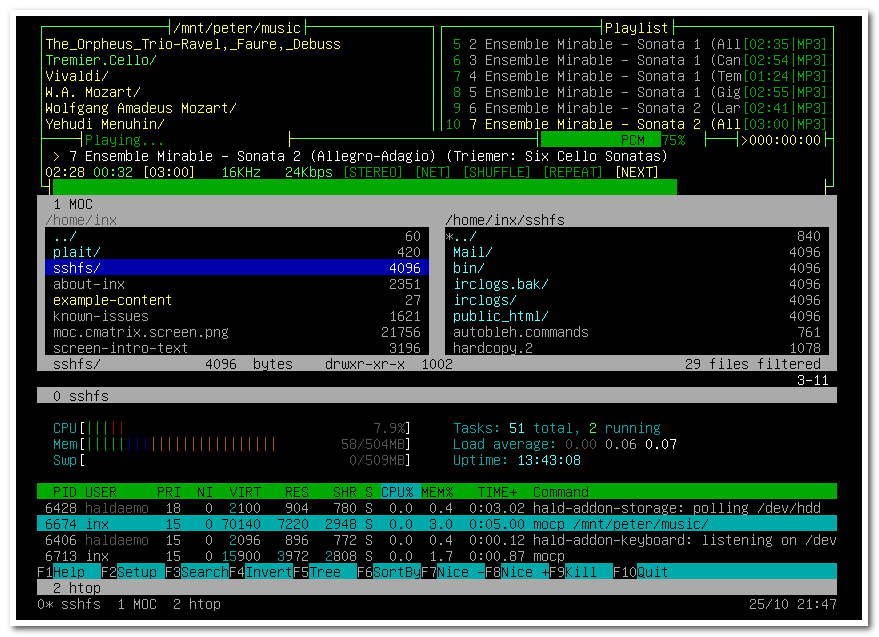
INX is an interesting Linux distro released today, which is based on Ubuntu 8.04 LTS and it is console only, without any graphical “X” programs. According to the release note INX is intended as a ‘tutorial’ and “introduction to the Bash command line”. It is important to note that INX is not the only console-only Linux distro. However their intention seems to be clear, as they are looking to build a console only “liveCD” distro which is “fun, and not intimidating for console beginners.”
Dynamic Virtual Terminal Manager? Click for larger image.
Some information about INX 1.0, quoting from their website:“INX 1.0 also includes new features; you can now set up wireless with the “Ceni” tool from the INX “Net & Web” menu. You can use your mouse with programs like xlinks2, elinks, mc, and the jed text editor. In addition to the powerful GNU Screen program, INX now sports the “Dvtm” Dynamic Virtual Terminal Manager, a “tiled terminal manager”.”
Not to confuse with my earlier post, I think there are enough supporters for both console users and GUI lovers to have distros specifically designed for their needs. If you are into consoles you might want to give INX a shot.
Related Posts:
- No related posts


INX is an interesting Linux distro released today, which is based on Ubuntu 8.04 LTS and it is console only, without any graphical “X” programs. According to the release note INX is intended as a ‘tutorial’ and “introduction to the Bash command line”. It is important to note that INX is not the only console-only Linux distro. However their intention seems to be clear, as they are looking to build a console only “liveCD” distro which is “fun, and not intimidating for console beginners.”
Dynamic Virtual Terminal Manager? Click for larger image.
Some information about INX 1.0, quoting from their website:“INX 1.0 also includes new features; you can now set up wireless with the “Ceni” tool from the INX “Net & Web” menu. You can use your mouse with programs like xlinks2, elinks, mc, and the jed text editor. In addition to the powerful GNU Screen program, INX now sports the “Dvtm” Dynamic Virtual Terminal Manager, a “tiled terminal manager”.”
Not to confuse with my earlier post, I think there are enough supporters for both console users and GUI lovers to have distros specifically designed for their needs. If you are into consoles you might want to give INX a shot.
Related Posts:
- No related posts
My esteemed ZDNet colleague Ed Bott, God bless him, wrote a very insightful piece in which he discusses Taiwanese PC mainboard and component manufacturer MSI's challenges of selling Linux-based versions of their netbook, the Wind U90. Apparently, according to MSI, Linux-based versions of their netbook are...
The Amarok team has proudly announced a few hours ago the second beta release of the upcoming Amarok 2.0 music player. The much-anticipated release brings lots of improvements, new features and numerous bug fixes.
The most important changes in Amarok 2.0 Beta 2 are:
· Incremental scanning support;
Last week was my 6 year ‘anniversary’ as a professional software developer. I like to look back on the past occasionally so i figured this is a good occasion to do so. I started working for Item Solutions (which we all refer to as Item) on October 2, 2002. At that time, it was hard to find a job as a software developer unless you had a few years of experience under your belt. I actually wanted to find a job in the Java world, or C++. After a few months of searching, i still hadn’t found a job and then an opportunity at Item kinda presented itsel
The Amarok team has proudly announced a few hours ago the second beta release of the upcoming Amarok 2.0 music player. The much-anticipated release brings lots of improvements, new features and numerous bug fixes.
The most important changes in Amarok 2.0 Beta 2 are:
· Incremental scanning support;
Last week was my 6 year ‘anniversary’ as a professional software developer. I like to look back on the past occasionally so i figured this is a good occasion to do so. I started working for Item Solutions (which we all refer to as Item) on October 2, 2002. At that time, it was hard to find a job as a software developer unless you had a few years of experience under your belt. I actually wanted to find a job in the Java world, or C++. After a few months of searching, i still hadn’t found a job and then an opportunity at Item kinda presented itsel