SysAd Linux blog covering linux tips, linux howtos, linux installation, linux tutorials, linux desktop, linux server, linux monitoring, installation and troubleshooting of linux softwares, desktop and servers.
Remember Automatix? Yes the nifty little application that made installing additional softwares on the Ubuntu system a breeze. Here comes the same for Fedora 9, FedoMATIX (v0.1Beta). It currently works on the command line only, but supports more than 60 additional softwares/apps already. The next version, which is due release in 2 months, will feature a GUI and many more softwares and hacks.
Remember Automatix? Yes the nifty little application that made installing additional softwares on the Ubuntu system a breeze. Here comes the same for Fedora 9, FedoMATIX (v0.1Beta). It currently works on the command line only, but supports more than 60 additional softwares/apps already. The next version, which is due release in 2 months, will feature a GUI and many more softwares and hacks.
Who says the Fedora is unstable and unreliable? The latest razor-sharp and bleeding-edge Fedora Linux OS powers the #1 supercomputer in the world!
The #1 supercomputer in the world, the IBM Roadrunner, produced at a cost of nearly $100 million dollars, runs Fedora. IBM has been working on and contributing to Fedora, using it as a prototype for the new cell architecture that leads to this supercomputer.
Who says the Fedora is unstable and unreliable? The latest razor-sharp and bleeding-edge Fedora Linux OS powers the #1 supercomputer in the world!
The #1 supercomputer in the world, the IBM Roadrunner, produced at a cost of nearly $100 million dollars, runs Fedora. IBM has been working on and contributing to Fedora, using it as a prototype for the new cell architecture that leads to this supercomputer.
Powerful linux file managers have been around for quite long time. They have revolutionized how file management can easily be done inside Linux X. This has been possible with the continuous stable development of Linux X features and stability. Current file managers have offered a lot of feature-rich and powerful file manager intuitive interface and functions. File managers distributed together KDE, GNOME and XFCE have done a well done work indeed.
Now, here's the newest released of extremely fast and feature-rich but lightweight linux file manager.
PCMan File Manager
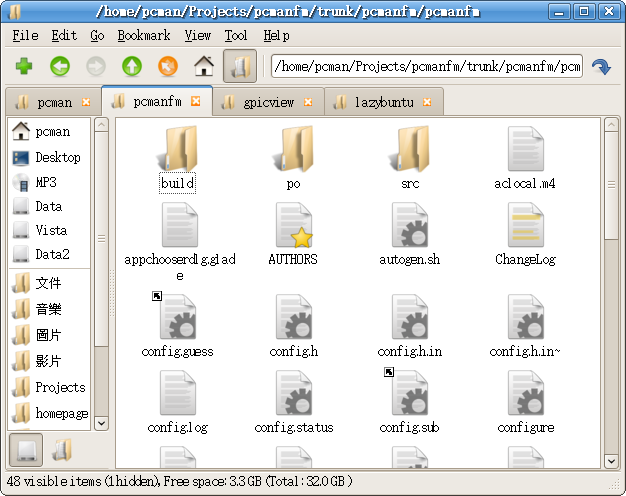
PCMan File Manager is an extremely fast and lightweight file manager which features multi tabbed browsing and user-friendly interface at the same time. PCMan is a powerful file manager but slim in memory resource usage and feature a multi-tab functionality that suits your heavy file operation needs while enjoying your low powered PC linux desktops. PCMan's file management interface behaves with a unique combination based from multi world of file manager like nautilus, windows explorer while offering the functionality feature similar to firefox multitab browser.
PCMan File Manager Installation in Fedora
# yum -y install pcmanfm
PCMan's Highlighted Features
Extremely fast and lightweight
Can be started in one second on normal machine
Tabbed browsing (Similiar to Firefox)
Built-in volume management (mount/umount/eject through HAL)
Built-in file searching utility (GUI frontend for the UNIX find + grep command)
Drag & Drop support
Files can be dragged among tabs
Load large directories in reasonable time
File association support (Default application)
Thumbnail for image files
Bookmarks support
Handles non-UTF-8 encoded filenames correctly
Provides icon view, compact view, and detailed list view
Resolving domains into human-readable IP addresses requires DNS IP addresses from your ISP. The DNS nature of resolving domain names into its equivalent IP addresses provides a lot of things to you and your ISP provider.
DNS Nature
One major thing that this DNS nature setup provides you is browsing convenience. Since DNS resolves domains into IP addresses, a user does not need to memorize all the converted IP addresses of all websites, as domain names are easy to remember.
But do you know that putting your ISP's DNS IP addresses into your network setting also allows your ISP to log all websites that you are browsing? DNS server setup by ISPs can generate logs of DNS resolutions.
This basically means, when you browse google.com website, DNS servers from ISPs resolves google.com into its equivalent IP addresses and at the same time, this process verbosely logs this DNS resolution process into server's DNS log file. Thus, system admins and DNS engineers could actually monitor and check those resolved websites by their DNS servers and they can easily tell if you are able to browse www.google.com or not.
Below are examples of websites being resolved by a DNS server.
Jul 24 16:55:24 ilovetux named[1282]: client 83.83.83.83 #60586: query: www.google.com IN A + Jul 24 16:55:24 ilovetux named[1282]: client 83.83.83.83 #60587: query: www.bbc.com IN A + Jul 24 16:55:24 ilovetux named[1282]: client 83.83.83.83 #60589: query: www.ilovetux.com IN A +
What if you do not want your ISP to log all websites that you are browsing?
One way to avoid this is to use alternative DNS IP addresses not managed by your current ISP setup.
Setup An Alternative DNS IP Addresses
Step One
One pair of publicly available DNS server is 198.6.1.1 and 198.6.1.2. Simply edit your network settings and change your DNS to reflect the new DNS IP addresses. In Fedora, Redhat, Centos, White OS; edit your /etc/resolv.conf
# nano -w /etc/resolv.conf
Restart DNS service
# service named restart
The above works without having an authoritative and caching DNS setup from your current linux box.
Step Two
Test your new DNS IP address from command line terminal
# nslookup yahoo.com
If the above resolves yahoo.com into its equivalent IP addresses without any errors, you should be able to start browsing the net.
Note that this scenario would work if your ISP does not block and reject any DNS query request from local clients going to any other DNS servers aside from their own DNS servers.
If you've ever used Microsoft Access or Excel, you have likely used a product that Mike Gunderloy had a hand in developing. The irony is that Gunderloy himself doesn't use those products anymore. He's given up Microsoft for open source -- and he's not going back.
Books, CDs, flashcards, classes -- there are a lot of tools to help you learn a foreign language. If you spend much of your time near a computer, software may be one of the better options. Ian McIntosh's Amigo is a friendly language utility for the Linux user, notable for how well it integrates into the desktop...
Even the most casual observer of the linux-kernel mailing must have noticed that, in the shadow of the firmware flame war, there is also a heated discussion over the management of security issues. There have also been some attempts to turn this local battle into a multi-list, regional conflict. Finding the right way to deal with security problems i..
If you've ever used Microsoft Access or Excel, you have likely used a product that Mike Gunderloy had a hand in developing. The irony is that Gunderloy himself doesn't use those products anymore. He's given up Microsoft for open source -- and he's not going back.
64-bit computing is as prevalent today as multicore computing. Almost any new processor from Intel or AMD has the AMD long mode extensions, allowing the processor to use 64-bit registers. While 32-bit processors can address 4 gigabytes of RAM, a 64-bit processor can address 16 exabytes, or almost 17.2 billion gigabytes, of RAM. Most 64-bit-capable computers aren't making use of these capabilities, but instead are put to work running 32-bit operating systems, usually because of a lack of applications for 64-bit operating systems, since applications must be recompiled and in some cases rewritten for 64-bit operation. It is possible, however, to run 32-bit Linux binaries natively under 64-bit Linux kernels.
Books, CDs, flashcards, classes -- there are a lot of tools to help you learn a foreign language. If you spend much of your time near a computer, software may be one of the better options. Ian McIntosh's Amigo is a friendly language utility for the Linux user, notable for how well it integrates into the desktop...
Even the most casual observer of the linux-kernel mailing must have noticed that, in the shadow of the firmware flame war, there is also a heated discussion over the management of security issues. There have also been some attempts to turn this local battle into a multi-list, regional conflict. Finding the right way to deal with security problems i..
Hundreds of windows scripts and softwares can be used to launch a brute force SSH attack to your SSH ports. These brute force attacks can easily send a combination of username and password pairs into your SSH port on automatic mode or on scheduled time period.
Most alarming feature of these kind of scripts and program malwares is that brute force details like username and password, can automatically be fed and supplied from millions of possible usernames and passwords pairs using a large base of dictionary file. The dictionary is widely available from internet and is compiled to have the most commonly used username and password combinations consisting of standard english names, numbers and special character combinations to provide a higher ratio of successful brute force SSH attack.
There are a lot of ways to handle SSH brute force attacks. One approach is by using Blockhosts rpm package.
Blockhosts scans log files for matching signatures. Blockhosts keeps track of records of how many times an attacking host failed to login via SSH and other ports before dropping the attacker to deny host file or blackhole file list. In other words, blockhost offers an automatic blocking of abusive IPs against specific daemon service like SSH ports, FTP ports and the like.
BlockHosts Installation
Blockhosts is not currently supported by Fedora repos. Download blockhosts rpm here and install it using rpm package installer.
# rpm -ivh BlockHosts-2.4.0-1.noarch.rpm
BlockHosts Setup and Configuration
Backup and modify /etc/blockhosts.cfg
Blockhosts would work by default configuratoin. Blockhosts installed its configuration file to
/etc/blockhosts.cfg
However, the most important line from /etc/blockhosts.cfg is the threshold value.
Blockhosts Threshold
This is the trigger point by blockhosts where the process of blocking abusive host would then be triggered.
COUNT_THRESHOLD = 7
Remember to remove comment characters # when modifying blockhosts configuration value.
Blockhosts Deny File
This could be either /etc/hosts.allow or /etc/hosts.deny files and can be configured with the similar setup line.
HOSTS_BLOCKFILE = "/etc/hosts.deny"
Blockhosts Deny Line
When blockhosts blocks an abusive IP, it drops the current IP to blockhosts deny file followed by SSH recognized line like
HOST_BLOCKLINE = ["ALL: ", " : deny"]
Accept as default.
Blockhosts Age Threshold
The main blockhosts program feature is to lessen the paranoid level of blocking hosts permanently. An optional threshold value measured in number of hours can be specified. This value can unblock and release the abusive IP addresses from the blackhole list or deny file.
AGE_THRESHOLD = 12
The above line leaves an abusive host or IP to blocked list for 12 hours quarantine time. Blockhosts Whitelist and Blacklist Labels
Identity excemptions using black and white list is also featured by blockhosts. A black and white list enlistment for multiple hosts can be done by using the below configuration lines.
You can edit the blockhosts mail feature for alerts and email notifications.
MAIL = True NOTIFY_ADDRESS = 'root@localhost.localdomain'
Lastly, edit your blockhosts deny file. You can refer to block host deny file.
# nano -w /etc/hosts.deny
Alternatively, if you specify the same deny host file of /etc/hosts.allow
# nano -w /etc/hosts.allow
Append the below lines into your blockhosts deny file.
#---- BlockHosts Additions
#---- BlockHosts Additions
Save and exit.
Blockhosts package supports blocking hosts based from failed attempts on ports by daemon services like OpenSSH, ProFTPd, VsFTPd, Pure-FTPd and more. For more installation help, you can view Blockhosts help file.
# nano -w /usr/share/doc/BlockHosts-2.4.0/INSTALL
Execute Blockhosts Binary
# blockhosts.py --verbose
The above line scans your blockhost log files for possible brute force attack and failed authentication logins. If found, abusive hosts and IP addresses would be enlisted to blockhosts deny file.
Blockhosts Crontab Scheduling
By regularly checking your system logs for possible abusive hosts, you can schedule a regular blockhosts check
The above line executes blockhosts phyton binary to check and monitor its log files for possible abusive script kiddies and port attacks. More info here.
Network of friends could send greetings to each other by saying any greeting phrases every now and then. Linux shell users and systems admins too could send a greeting messages, daily announcement, scheduled maintenance message or simply a message of the day to power linux shell users every time they visit their linux shell. Greeting shell users with these message could even swept away shell moods and start a good working day.
Here's a quick tip to customize linux message of the day.
Being aware of the server's remaining partition's capacity with respect to total account's mailbox usage, particularly with /var partition, is one good practice that brings anybody one step ahead of server disk capacity monitoring and planning. This storage capacity monitoring can be done via web inteface, email alerts or direct from command line terminal.
There are times, you just need to have a quick view of account users occupying the largest portion of your mail partition, just for a quick check. There could be a time when you need to list down the top listing of most mailbox receivers or the currently highest mbox file size from your current terminal.
Here's how to check the top most disk space consuming account user from your linux box
To determine the top list of mailbox user
Go to your mbox partition folder
# cd /var/mail
List down a set of system users with the highest mbox size. This could be using linux ls command with sorting parameter
# ls -lS
The above list down all mbox system users sorted from highest to lowest mbox size.
Now, to list down the top 10 of most active mbox user, simply
# ls -lS | head -10 -rw-rw---- 1 mfeyisola mail 1899991503 Jul 24 11:35 mfeyisola -rw-rw---- 1 kekechukwu mail 1783244690 Jul 24 11:34 kekechukwu -rw------- 1 arakoyounian mail 1620349072 Jul 24 11:41 arakoyounian -rw------- 1 kadaramoye users 1144226769 Jul 24 11:29 kadaramoye -rw-rw---- 1 conukegbe mail 1092718167 Jul 24 11:32 conukegbe -rw------- 1 tmoussalli mail 1087506538 Jul 24 11:41 tmoussalli -rw------- 1 aogiri mail 878866381 Jul 24 11:42 aogiri -rw------- 1 mobateru mail 874813665 Jul 24 11:42 mobateru -rw-rw---- 1 jesedebe mail 820077436 Jul 24 11:33 jesedebe With reverse effect, to list down the least active mailbox system users,
# ls -lS | tail -10
-rw-rw---- 1 rpm mail 0 2008-07-18 18:15 rpm -rw-rw---- 1 smmsp mail 0 2008-07-18 18:16 smmsp -rw-rw---- 1 squid mail 0 2008-07-18 18:17 squid -rw-rw---- 1 sshd mail 0 2008-07-18 18:19 sshd -rw-rw---- 1 tcpdump mail 0 2008-07-18 18:17 tcpdump -rw-rw---- 1 torrent mail 0 2008-07-18 18:18 torrent -rw-rw---- 1 vcsa mail 0 2008-07-18 18:16 vcsa -rw-rw---- 1 ver mail 0 2008-07-18 20:33 ver -rw-rw---- 1 webalizer mail 0 2008-07-18 18:17 webalizer -rw-rw---- 1 xfs mail 0 2008-07-18 18:20 xfs
These commands could be expanded and be integrated with other linux command like awk and grep.
Tectonic: "Lately, there has been quite some bitching on the fringes of the KDE project about KDE4 and the direction it takes. Some people go as far as saying: “Give us back our old desktop!” I beg to differ. The old desktop has served us well for thirty-odd years since its invention by Xerox. It is beyond its due date by now. We need something new that meets the reality we are living in now."
Arnaud's Open Blog: "Essentially, the ISO and IEC courts of appeal are made of a jury composed of a subset of the very same parties that judged OOXML in the first place. Now, I’m not a law expert by any means but it doesn’t take much expertise to figure out that such a set up is bogus."
Tectonic: "Lately, there has been quite some bitching on the fringes of the KDE project about KDE4 and the direction it takes. Some people go as far as saying: “Give us back our old desktop!” I beg to differ. The old desktop has served us well for thirty-odd years since its invention by Xerox. It is beyond its due date by now. We need something new that meets the reality we are living in now."
Arnaud's Open Blog: "Essentially, the ISO and IEC courts of appeal are made of a jury composed of a subset of the very same parties that judged OOXML in the first place. Now, I’m not a law expert by any means but it doesn’t take much expertise to figure out that such a set up is bogus."
With hundreds of linux terminal command lines being saved to shell history file, a good practice of repeating old and previous command line command and argument is another convenience we could make use of.
By realizing a mistake from a recently issued linux command like
# vi /usr/share/wordpress/wp-content/themes/vertito/images/imgs/
could be tiresome specially if the linux command parameter is longer 50 characters.
One approach to tackle this scenario is by simply hitting the ketboard's Up Arrow Key to repeat the previously issued linux command. This Up Arrow keystoke, when pressed inside a shell environment, repeats the previously issued command taken from the keystroke command buffer ring. The problem with using this shortcut keystroke is that it cycles back to previously issued wrong linux command or command with wrong parameter. Tendency is you hit more keystroke combinations to edit the command, say Control + A to begin editing the first few letters of the command or Control + E to modify the last portion of the command.
If you want to repeat the recently issued command line parameter from the previously issued command, you can use this approach.
Say, to list down directory contents of a folder, we issue the below command by mistake
# vi /usr/share/wordpress/wp-content/themes/vertito/images/imgs/
But our intention is to list down the files and directory on that folder. This basically means we need to retype the parameter, or do the Up Arrow key to repeat the previously issued command. Here's another alternative to accomplish the same task.
# ls -la !*
!* combination repeats the last supplied command with the previous command.
SuperTuxKart 3D go-kart racing game for kids with several famous OpenSource mascots participating. Race as Tux against 3 computer players in many different fun race courses (Standard race track, Dessert, Mathclass, etc). Full information on how to add your own race courses is included. During the race you can pick up powerups such as: (homing) missiles, magnets and portable zippers.
# yum install supertuxkart
NeverBall Tilt the floor to roll a ball through an obstacle course within the given time. If the ball falls or time expires, a ball is lost. Collect 100 coins to save your progress and earn an extra ball. Red coins are worth 5. Blue coins are worth 10.
# yum install neverball
Flight Gear The Flight Gear project is working to create a sophisticated flight simulator framework for the development and pursuit of interesting flight simulator ideas. We are developing a solid basic sim that can be expanded and improved upon by anyone interested in contributing.
# yum install FlightGear
Penguin-Command Penguin Command is a clone of the classic "Missile Command" Game, but it has better graphics and music. The gameplay has only been slightly modified. Penguin Command is licensed under the GPL.
# yum install penguin-command
Crack Attack A puzzle/action game in which you rush to eliminate colored blocks before they fill your screen. Particularly clever eliminations cause garbage to clutter your opponent's screen. Who will survive the longest!? Playable both online and off.
# yum install crack-attack
Clan Bomberman ClanBomber is a free (GPL) Bomberman-like multiplayer game that uses ClanLib, a free multi platform C++ game SDK. First "ClanBomber" was only a working title for a small game started in September 1998, that has only been started to learn how to use ClanLib. But the ClanBomber project has grown into a real game. It is fully playable and features Computer controlled bombers, however, it is recommended to play ClanBomber with friends (3-8 players are really fun).
# yum install clanbomber
Penguin PRacer PPRacer is a simple OpenGL-based racing game featuring Tux. The objective of the game is to slide down a snow- and ice-covered mountain as quickly as possible, avoiding the trees and rocks that will slow you down.
# yum install ppracer
Tremulous Tremulous is a free, open source game that blends a team based FPS with elements of an RTS. Players can choose from 2 unique races, aliens and humans. Players on both teams are able to build working structures in-game like an RTS. These structures provide many functions, the most important being spawning. The designated builders must ensure there are spawn structures or other players will not be able to rejoin the game after death. Other structures provide automated base defense (to some degree), healing functions and much more...
# yum install tremulous
FreeCiv Freeciv is a turn-based, multi-player, X based strategy game. Freeciv is generally comparable to, and has compatible rules with, the Civilization II(R) game by Microprose(R). In Freeciv, each player is the leader of a civilization, and is competing with the other players in order to become the leader of the greatest civilization.
# yum install freeciv
Glest Glest is a free 3D real time strategy game, that can be modified using XML and a set of tools. Glest takes place in a context which could be compared to that of the pre-renaissance Europe, with the licence that magic forces exist in the environment and can be controlled.
# yum install glest
Duel3 - 2D SpaceShip Duel The sudden attack from the Martain Rim miners caught the Earth by suprise, there was no way the meager Earth Space Fleet could defend themselves. The miners attacked, and eliminated their enemies, and then returned to the asteroid belt. However, Earth could not accept such an embarrassing defeat. The military developed new space fighters, and trained several squadrons of elite pilots. The task force was then deployed against the miners. These trained pilots utterly defeated the miners in a matter of weeks, and the first space war in human history was finished.
# yum install duel3
XMoto - 2D MotoCross Platform Game X-Moto is a challenging 2D motocross platform game, where physics play an all important role in the gameplay. You need to control your bike to its limit, if you want to have a chance finishing the more difficult of the challenges. First you'll try just to complete the levels, while later you'll compete with yourself and others, racing against the clock.
Scorched 3D is another classic 3D linux tank game that is based on a DOS game polished with more features such as OpenGL supported, multiple player and weapon options, more landscape island war environment spots, LAN-enabled enemies, save and retrieve game levels and more. Scorched 3D tank game can be played by stand-alone or online.
Man Scorched 3D: Scorched 3D is a game based on the classic DOS game Scorched Earth "The Mother Of All Games". Scorched 3D adds amongst other new features a 3D island environment and LAN and internet play. At its lowest level, Scorched 3D is just an artillery game with two+ tanks taking turns to destroy opponents in an arena. Choose the angle, direction and power of each shot, launch your weapon, and try to blow up other tanks. But Scorched 3D can be a lot more complex than that, if you want it to be. You can earn money from successful battles and use it to invest in additional weapons and accessories. You can play with up to twenty four other players at a time, mixing computer players with humans. There's a variety of changing environmental conditions and terrains to be dealt with.
Scorched 3D is totally free and is available for both Microsoft Windows and Unix (Linux, FreeBSD, Mac OS X, Solaris etc.) operating systems.
You can pick up the game and begin playing very quickly. Then, when/if you are interested, you can poke in the dimmer recesses of the game and get into the strategy (or just ignore it altogether!).
The main objective of the game is to stand from the rest of the enemy tanks. Last tank standing wins.
Scorched 3D is available from Fedora Project repos. Thus, the tank game can be installed via yum. From Fedora 8, simply issue the following yum command for installation.
The above command will install the necessary dependencies including non-installed opengl package. Yum would download an approximately 60 MB of package files.
Screenshots
More wiki documents can be found from here and mods are widely available from here.
This quick post should have been here since but I keep on forgetting about this quick howto.
Download Videos from Youtube from Fedora box
Tired of watching and browsing the same old video files from Youtube? Do you wish to collect Youtube video clips of your favorite video files from youtube? Now, you can do it inside your Fedora box. If you wish to download video clip files from YouTube.com into your desktop, read on.
Youtube Download Installation
Simply install youtube video downloader called Youtube-dl. Youtube downloader is a command line-driven linux tool designed to download youtube videos into your desktop, you got it right. Download youtube videos from youtube into your Fedora box.
Simply folow this yum installation
# yum -y install youtube-dl
Youtube-Dl Usage
The video clip shown below is one of the fastest one-handed rubix cube solver that solves rubix cube in less than 18 seconds as you can see.
Now, if you with to download the above video using youtube video downloader, simply
Playing KSquare game allows you to put a single stick to connect into group of squared patterns presented in a matrix type of columns and rows. This KSquare game allows you to have a single move at a time alternating each turns. Each time you drop a stick into the matrix, your opponent tries to check and see if a possible square can be formed from your last move.
The rules with KSquare is simple, regardless of how many rows and columns of square patterns the game has, the highest squares formed by a player wins.
KSquare is fairly easy to beat. The trick is to establish a fallback move-trap wherein your opponent will be forced to lay down his stick to a location where the least square could be formed. This trap is a must for both players as when the game gets touch, both players have the chance to use those multiple fall back traps to his advantage. The after effect of this fall back trap is for the opponent to complete his turn with the fall back trap and continue laying out a stick into the matrix providing you a turn to form higher number of squares. This approach would definitely beat a computer opponent.
Here's a simple screenshot of a computer opponent being defeated.
As you can see, there are two sets of fallback traps, one with a higher chance of gaining squares compared to the other one, which has only 4 possible squares to complete. The red player wins the game as you can see.
KSquare does not need more of keyboard action moves, and point and shoot skills - it simply needs a basic skill set to estimate an opponent's possible move but much more simpler than playing chess.
On small and medium scale server environment, most linux servers are not equipped with X (GNOME/KDE) graphical platform that makes the task of uploading and downloading FTP files to and from your current location a much more easier task. Consider a robust FTP client software equipped with user-friendly and graphical menu interface to upload/download FTP files could offer a much more convenient and easier process to accomplish FTP file operations compared to command-line driven FTP commands.
What do you do if your linux system does not support graphical X11 programs? What steps you can follow from your linux desktop without X to process FTP task into your FTP server? Here's a quick entry on how to accomplish that.
Download and Upload FTP Files from Command Line Terminal
Minimum Requirements
1. Existing FTP server 2. Existing FTP user account details
Step One
Connect and log on to your FTP server from terminal. Supply the required FTP username and password.
# ftp domain.com
Launching the above command would give you similar lines as shown below
Connected to domain.com (83.83.83.83). 220---------- Welcome to Pure-FTPd [TLS] ---------- 220-You are user number 2 of 50 allowed. 220-Local time is now 03:32. Server port: 21. 220-This is a private system - No anonymous login 220 You will be disconnected after 15 minutes of inactivity. Name (domain.com:root): ftpuser Password: ******* 230-User ftpuser has group access to: ftpuser 230 OK. Current restricted directory is / Remote system type is UNIX. Using binary mode to transfer files.
Now, the last line showed that the curent binary mode of file transfer is binary. You can optionally modify this value.
To change FTP file transfer mode to ASCII
To transfer all ASCII file types, simply
ftp> ascii
To change FTP file transfer mode to binary
ftp> bin
Step Two
Identify your current local and remote directory location.
To change your current local directory ftp> lcd /home/user1 Local directory now /home/user1 To change your current FTP directory folder
ftp> cd www 250 OK. Current directory is /www
To list down all remote FTP files from current directory location
ftp> ls # ls *.html # ls *.php
Alternatively, you can use dir
ftp> dir ftp> dir *.php
When transferring files, by default configuration, the current file transfer status is now shown. You could setup your current connection to shown you current command status and even send you a beep when the last issue FTP command has been completed.
To show FTP file transfer status for file transfer
ftp> hash
To toggle hash status, simply re issue hash command again.
To send alert on FTP command completion
ftp> bell Step Three
Now that your current local and remote location have been identified, you can now begin your FTP file transfer
To upload a file from local to remote FTP server
ftp> put filename.txt ftp> put filename.php
To upload multiple files to remote FTP server
ftp> mput *.php
To confirm file changes from remote, simply re issue a directory listing command
ftp> ls
To download FTP files into your local folder
ftp> get filename.txt
To download multiple FTP files from terminal
ftp> mget *.php
To disconnect from FTP connection
ftp> bye ftp> quit
221-Goodbye. You uploaded 0 and downloaded 1 kbytes. 221 Logout.
The total number of uploaded and download FTP files will be shown to you when disconnecting from FTP server as shown above.
Whenever a sendmail receives SMTP request and connection from a remote host, it spawn's a new copy of itself to deal with incoming mail messages. This approach makes it useful for sendmail to process multiple incoming mails simultaneously. However, the nature of linux application always comes with a trade off thing. This issue of spawning another sendmail daemon child would consume another portion of system and thus could hogged down your email server.
Considering the openness of email address nature, an email bomber could launch a malicious flood attack to an email server with bunch of emails for delivery that could easily be done automatically using automated software. This scenario could cause sendmail denial of service.
The below sendmail directives option could restrict and limit the number of sendmail children to spawn, limit the number of connections to receive per second, restrict sendmail process incoming header size, and lastly, limit the maximum acceptable size of one message. By setting this sendmail directive, the effectiveness of such denial of sevice attack to sendmail could be limited and/or delayed.
Sendmail Directives
confCONNECTION_RATE_THROTTLE
This is number of connections sendmail server can receive per second. By default rpm installation, Sendmail does not limit the number of connections per second it can receive. If the value configured here is set and reached, any further connections are then delayed.
confMAX_DAEMON_CHILDREN
This is the number of child processes that can be spawned by the server, or refers to sendmail children. By default rpm installation, Sendmail does not define a limit to the number of spawned child daemon. If this limit is reached, further connections are also delayed.
confMIN_FREE_BLOCKS
This is the minimum number of free blocks is available for sendmail server when accepting mails. The default is 100 blocks. Once the value specified with this sendmail directive is reached, sendmail is instructed to stop accepting mails.
confMAX_HEADERS_LENGTH
This is the maximum acceptable size (in bytes) of an email's message header. Any email message headers that reached this limit would not be accepted and denied from being queued for delivery. confMAX_MESSAGE_SIZE
Limiting the the maximum acceptable size (in bytes) of an email message could also limit the possible attachment bomb attack against sendmail server. Implementing a maximum message size could set a limit to email message maximum size. An example sendmail.mc entry would likely be\
confMAXRCPTSPERMESSAGE
This is the number of recipients per message. Limiting the maximum recipient one email message could have could restrict any email bomber trying to send an email to multiple recipients.
To implement the above sendmail directive, simply backup and modify your /etc/mail/sendmail.mc and recompile it again. For the changes to take effect, simply restart your sendmail service like so
# vi /etc/mail/sendmail.mc # m4 /etc/mail/sendmail.mc > /etc/mail/sendmail.cf # service sendmail restart
This entry aims to address file handling of RAR file types. If you are receiving this type of files from your inbox, you can configure your fedora linuxsystem to support RAR compressed file types.
Fedora repository supports rpm package designed to handle and uncompressed RAR file types via unrar rpm package.
UnRAR Installation - Support RAR File Types in Fedora Linux
Unrar rpm package is supported by Fedora repository.
To install unrar rpm package, simply
# yum -y install unrar
To Extract Compressed RAR Files
# unrar example.rar /home/user
The above would extract files inside the compressed RAR file example.rar into /home/user as its destination extraction directory.
To Extract RAR Files to Current Directory
# unrar e example.rar
To List All Archived Files inside RAR File
# unrar l example.rar
The above command would only list out the files inside the compressed RAR files.
To Verbosedly Extract RAR files with Full Path
# unrar xv example.rar
To convert output filenames into lowercase or uppercase filename using unrar, simply
For lowercase filename output conversion using unrar
# unrar cl example.rar
For uppercase filename output conversion using unrar
# unrar cu example.rar
To unrar files with specific file size like files with less than or more than specific file size,
For less than unrar usage
# unrar sl<size>
For more than unrar usage
# unrar sm<size>
Unrar supports many command line parameter, you can see its man page
Changing file permission is a file security thing. Any file owned by another user with improper file permissions could grant file access for free to any system users. This could also lead to super user access to the whole operating system in the case of improper default umask value with shadow and password files.
Introducing Umask
Umask is a system environment variable which is used for setting default file permissions on operating system. Umask can be configured with a system wide default value automatically or on per user basis.
Umask Usage
Umask usage with with file and directories has different value. To determine specific umask values, use a simple arithmetic procedure with the common umask value for file, which is 666 and 777 for directories.
Say, if you want all newly files to be created with file permissions of 660, set your umask to 006. That is 666 minus (-) determined file permission of 660 would equal to 006.
Alternatively, to set for a reasonable default file permission value of 644 would need a umask value of 022. This will cause files to be created with default permissions of 644 , that is (rw-r--r--) file permission set.
For directory permission, you could subtract 777 umask common value. Say, a desired directory permission of (rwxrwx---) 770 would need a umask value of 007.
For paranoid secure value, a default umask value of 066 would create new files with 600 (rw-------) and directories with permissions of 700 (rwx-----) .
Determine System Umask Value
Issue umask without any parameters
# umask
System-wide Umask Setting The default umask value for system wide configuration can be viewed inside your /etc/bashrc file.
Per-User Umask Value Setting
To set a per-user settings with umask, simply backup and modify a user's .bashrc file located from the user's default home directory. Make sure that your specific user's umask value is appended to the last line of the the said .bashrc file.
Save and exit. Changes would take effect on new login shells and file/directory creations.
The thing with browsers nowadays is the more you equip it with addons, plugins, and powerpack browser features, the heavier the load it gets and the slower your PC desktop runs. You could find a lot of browser tweaks and hacks to make your browser faster and works quicker than its default setup, what goes down the drain is how much memory footprints does your browsers take? With or without browser optimizations, tweaks and hacks, there should be an approximate value how much does your browser consumes up with your desktop memory. If you want to install an alternative lightweight graphical desktop, read on.
Introducing Kazehakase
Kazehakase is a graphical web browser which aims to provide a very simple graphical user interface that is truly user-friendly and fully customizable. Kazehakase uses Gecko for rendering HTML pages like Galeon and Epiphany. Here are its main features.
Tabbed Browsing
Bookmarks
Variable Toolbars
Customizable mouse gestures
Customizable key accelerator
Print Support
How To Install Kazehakase on Fedora
# yum -y install kazehakase
# kazehakase
If you will browse heavy sites like CNN or Yahoo!, kazehakase is not for you as those mentioned sites would require the latest flash and java versions not allowing you to proceed browsing the site.